Hyper-V cannot be installed. The processor does not have second level address translation capabilities. September 19, 2012
Posted by juanpablo1manrique in Hyper-V, Windows 8.Tags: Hyper-V, Windows8
12 comments
Bueno con la maravilla de Windows 8, viene el servicio de Hyper-V de manera nativa, esto es excelente y es muy fácil de instalar, solo es tema de entrar a
Panel de control -> Programas y Caracteristicas -> Activar o desactivar las caracteristicas de Windows -> Hyper-V
El problema surge cuando al intentar seleccionar Hyper-V Platform el mismo aparece deshabilitado,
Lo primero que debemos hacer es reiniciar el PC y verificar que el soporte a virtualización este habilitado, luego de ello reiniciar, en mi caso la opción permaneció deshabilitada, investigando encontre que a algunas personas les ha funcionado que deshabilitando USB 3.0 y SLAT, y al reiniciar ya funciona.
En mi caso tengo un HP 425 y no posee esas opciones, pero deshabilite en la BIOS las opciones de
- Wake On USB
- USB legacy support
Y funciono correctamente, según entiendo esto es un bug de windows 8 con respecto a la virtualización que se arreglara en una próxima revision
Happy Hyper-v
PD. Si virtualizas con VMWare puedes consultar http://helpdeskgeek.com/windows-8/enable-windows-8-hyper-v/
Ejemplo Update e Insert Masivo September 3, 2012
Posted by juanpablo1manrique in SQL SERVER 2008.Tags: SQLSERVER2008
add a comment
El códgio dice más que mil palabras
Update dbo.RRHH
SET JefeDirectoTelefono = R2.Telefono,
JefeDiretoNombre = R2.Nombres + ‘ ‘ + R2.Apellidos
from dbo.RRHH
INNER JOIN dbo.RRHH R2
ON dbo.RRHH.JefeDirecto = R2.UserName
–Actualizar datos en tabla de verdad
UPDATE FactBroadBand
SET FactBroadBand.TotalMonth = Temp.TotalMonth
FROM #Carrusel Temp
WHERE FactBroadBand.SourceKey = Temp.SourceKey AND
FactBroadBand.TimeKey = Temp.TimeKey AND
FactBroadBand.UnitKey = Temp.UnitKey AND
FactBroadBand.BroadBandKey = Temp.BroadBandKey
–Insertar datos en tabla de verdad
INSERT INTO dbo.FactMonthBalance (TimeKey,BalanceCategoryKey,SourceKey,UnitKey,TotalMonth)
SELECT
Temp.TimeKey,Temp.BalanceCategoryKey,
Temp.SourceKey,Temp.UnitKey,Temp.TotalMonth
FROM #TempFactBalance Temp
LEFT JOIN FactMonthBalance Fact
ON Fact.TimeKey = Temp.TimeKey
AND Fact.BalanceCategoryKey = Temp.BalanceCategoryKey
AND Fact.SourceKey = Temp.SourceKey
AND Fact.UnitKey = Temp.UnitKey
WHERE Fact.BalanceCategoryKey is null
Share Point 2010 en Windows8 September 2, 2012
Posted by juanpablo1manrique in SharePoint, Windows 8.Tags: SharePoint, Windows8
1 comment so far
Buen día amigos
Les cuento que he iniciado en el proceso de conocer Windows 8, para minimizar la cantidad de cambios que tenía que hacer instale Windows 8 sobre el mismo Windows 7 que ya tenía todas las aplicaciones instaladas y ya tenía SharePoint 2010 Instalado,
Instale Windows 8 con un archivo .ISO por medio de GIZMO para el montaje del ISO y todo funciono perfecto, lo que me evito quemar un CD con los medios,
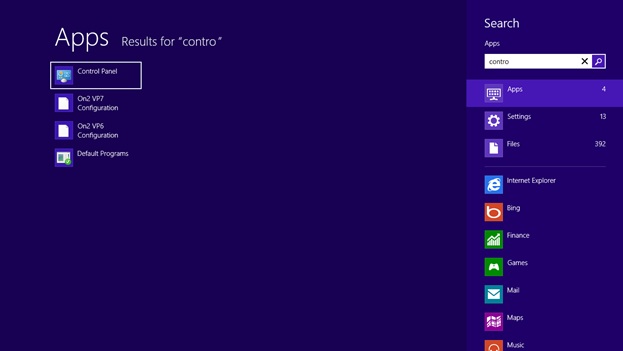
Al iniciar el proceso la primera tarea fue ingresar al Control Panel y aquí descubrí una de las primeras funcionalidades de Windows 8, se le puede dar la tecla Windows y luego escribir directamente lo que queremos y saldrá la ventana de búsqueda de aplicaciones.
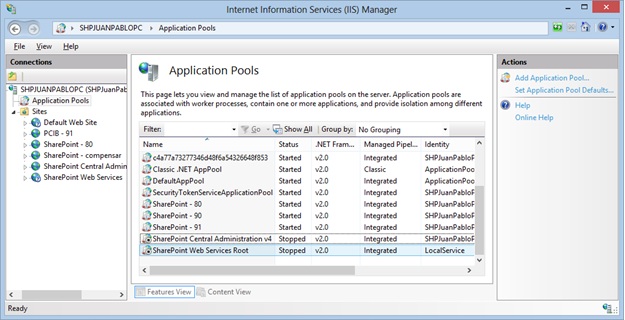
El el IIS aparecen los pool pero esta detinidos,
Al intentar iniciarlo y luego ingresar al sitio aparece este error

Y si se vuelve al IIS el pool se detiene nuevamente,
Al revisar las propiedades del usuario apareció que estaba activada la opción de “User must change password at next logon”

Le elimine la opción y le cambie la contraseña, adicionalmente verifique la opción de “Log on as a batch job” dado que se presentó este error en el eventviewer,

Para cambiar la política es necesario ingresar a la consolo mmc.exe y luego a local computer policy y agregar el usuario de servicio,

Y luego al intentar ingresar al central administrator ya ha vuelto a la vida

Pero nuestro sitio principal continuaba fallando,
Así que vamos y abrimos el web.config, aquí vemos otra de las nuevas ventanas de Windows 8,
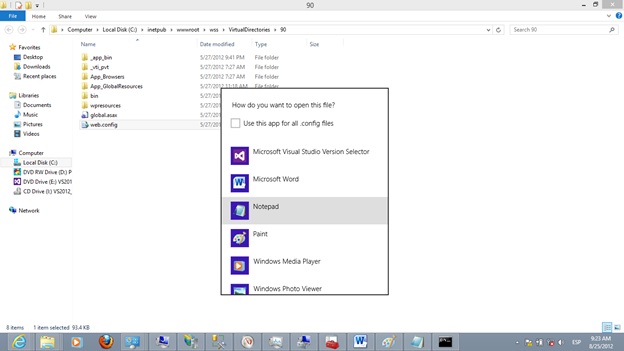
Y lo modificamos para que podamos ver los errores para nosotros los desarrolladores, con SharePoint he aprendido a querer las ventanas amarillas,
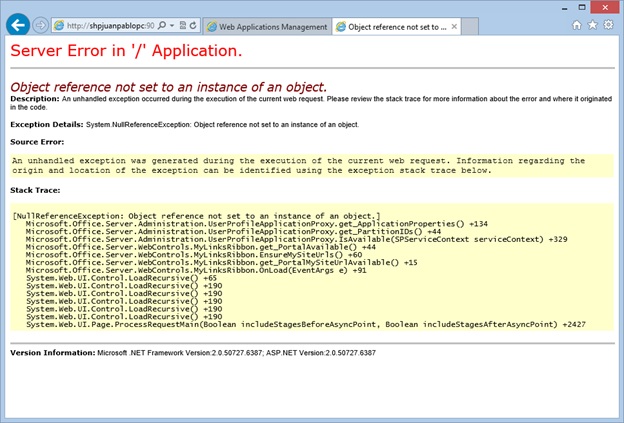
Al revisar el event viewer se encontró el siguiente error,

The identity of application pool SharePoint Central Administration v4 is invalid. The user name or password that is specified for the identity may be incorrect, or the user may not have batch logon rights. If the identity is not corrected, the application pool will be disabled when the application pool receives its first request. If batch logon rights are causing the problem, the identity in the IIS configuration store must be changed after rights have been granted before Windows Process Activation Service (WAS) can retry the logon. If the identity remains invalid after the first request for the application pool is processed, the application pool will be disabled. The data field contains the error number.
System.ServiceModel.ServiceHostingEnvironment+HostingManager/33711845
Exception: System.ServiceModel.ServiceActivationException: The service ‘/SecurityTokenServiceApplication/securitytoken.svc’ cannot be activated due to an exception during compilation. The exception message is: Exception has been thrown by the target of an invocation.. —> System.Reflection.TargetInvocationException: Exception has been thrown by the target of an invocation. —> System.ArgumentNullException: Value cannot be null.
Parameter name: certificate
Buscando En internet encontre este blog con algunas recomendaciones,
http://www.mysharepointadventures.com/2011/07/security-token-service-application-broken/
Intente correr el configuration wizard pero no funciono, así que reinicie,
Luego de mucho intentar entrar a los sitios y al central administrator logre entrar, mi sharepoint revivió,
Algo que detecte es que la consola de SQL SERVER Configuration Manager había desaparecido así que fui a buscarla en C:\Windows\SysWOW64\SQLServerManager10.msc

Al ejecutarla encontré el siguiente error
The remote procedure call failed. [0x800706be]
Al ver este error encontré que se puede descargar el service pack 2 de SQL SERVER 2008 R2 e instalarlo y esto soluciono el problema.
http://www.microsoft.com/en-us/download/details.aspx?id=30437
Espero que les sea de utilidad
SQL SERVER 2008 Enterprise VS Standard VS WorkGroup VS Web VS Express August 29, 2012
Posted by juanpablo1manrique in SharePoint, SQL SERVER 2008.Tags: SQLSERVER2008
3 comments
Recordando a mi buen amigo SQL SERVER 2008 …
| SQL SERVER 2008 | Enterprise | Standard | Work Group | Web | Express |
| Scalability & Performance | |||||
| Number of CPUs | 8 CPU | 4 CPU | 2 CPU | 4 CPU (Web Workloads Only) | 1 CPU |
| Memory Utilization | 2 TB Ram | 64 GB Ram | 4 GB Ram | OS Maximum | 1 GB Ram |
| Database Size | 524PB | 524PB | 524PB | 524PB | 10GB |
| x32 Hardware Support | Full | Full | Full | Full | Full |
| x64 Hardware Support | Full | Full | Full | Full | Full |
| Data Compression | Full | ||||
| Resource Governor | Full | ||||
| IA64 hardware support | Full | ||||
| Table and Index Partitioning | Full | ||||
| Parallel Index Operations | Full | ||||
| Parallel Consistency Checks (DBCC) | Full | ||||
| Scalable Shared Databases | Full | ||||
| Indexed views | Full | ||||
| Enhanced Read-ahead and Scan | Full | ||||
| High Availability (Always On) | |||||
| Database Mirroring | Yes (full) | Yes (Single Safety Full Only) | Witness only | Witness only | Witness only |
| Online System Changes | Full | Full | Full | Full | Full |
| Log Shipping | Full | Full | Full | Full | |
| Clustering | 16-node failover clustering | 2-node failover clustering | |||
| Automatic Corruption Recovery from Mirror | Full | ||||
| Log Stream Compression | Full | ||||
| Online Indexing | Full | ||||
| Mirrored Backups | Full | ||||
| Resource Governor | Full | ||||
| Backup Compression | Full | ||||
| Hot-add Memory and CPU Support | Full | ||||
| Database Snapshots | Full | ||||
| Fast Recovery | Full | ||||
| Online Page and File Restore | Full | ||||
| Replication | Full | ||||
| Replication | |||||
| SQL Server Change Tracking | Full | Full | Full | Full | Full |
| Merge Replication | Full | Full | Subscriber only ** | Subscriber only | Subscriber only |
| Transactional Replication | Full | Full | Subscriber only ** | Subscriber only | Subscriber only |
| Snapshot Replication | Full | Full | Subscriber only ** | Subscriber only | Subscriber only |
| Heterogeneous Subscribers | Full | Full | |||
| Oracle Publishing | Full | ||||
| Enterprise Security | |||||
| C2 Complaint Tracing | Full | full | Full | Full | Full |
| SQL Audit | Full | ||||
| Transparent Database Encryption | Full | ||||
| Extensible Key Management | Full | ||||
| Enterprise Manageability | |||||
| Hypervisor Support | Full | Full | Full | Full | Full |
| Database Migration Tools | Full | Full | Full | Full | Full |
| Policy-Based Management | Full | Full | Full | Full | Full |
| SQL Server Management Studio Tools | Full | Full | Full | Full | Full |
| * Database Mail | Full | Full | Full | Full | |
| Performance Data Collection | Full | Full | Full | Full | |
| SQL Server Agent | Full | Full | Full | Full | |
| Database Tuning Advisor | Full | Full | Full | Full | |
| Plan Guides | Full | Full | Full | ||
| SQL Profiler | Full | Full | Full | ||
| Standard Performance Reports | Full | Full | |||
| Distributed Partition Views | Full | ||||
| Parallel Index Operations | Full | ||||
| Automatic Query-to-index-View Matching | Full | ||||
| Unlimited Virtualization | Full | ||||
| Data Warehousing | |||||
| Create Cubes Without a Database | Full | Full | |||
| Auto-generate Staging and Datawarehouse Schema | Full | Full | |||
| Attribute Relationship Designer | Full | Full | |||
| Efficient Aggregation Designers | Full | Full | |||
| Scalable read-only AS | Full | ||||
| Partitioned Cubes | Full | ||||
| Distributed Partitioned Cubes | Full | ||||
| Data Compression | Full | ||||
| Star Join Query Optimizations | Full | ||||
| Change Data Capture (CDC) | Full | ||||
| Integration Services | |||||
| SQL Server Import and Export Wizard | Full | Full | Partial | Partial | Partial |
| Log Providers and Logging | Full | Full | |||
| XML Source | Full | Full | |||
| SSIS Run-time | Full | Full | |||
| Basic Data Profiling Tools | Full | Full | |||
| SSIS Package Designer & Service | Full | Full | |||
| Data Mining Query Transformation | Full | ||||
| Data Mining Model Training Destination Adapter | Full | ||||
| Fuzzy Grouping Transformation | Full | ||||
| Fuzzy Lookup Transformation | Full | ||||
| Term Extraction Transformation | Full | ||||
| Dimension Processing Destination Adapter | Full | ||||
| Partition Processing Destination Adapter | Full | ||||
| Reporting Services | |||||
| Reporting Services Memory Limits | OS Max | OS Max | 4GB | 4GB | 4GB |
| Report Designer | Full | Full | Full | Full | Full |
| Report Manager | Full | Full | Full | (report manager) | (report manager) |
| Role-based Security | Full | Full | (fixed roles) | (fixed roles) | (fixed roles) |
| Basic Data Profiling Tools | Full | Full | Full | Full | Full |
| Export to Excel, Word, PDF and Images | Full | Full | Full | Full | Full |
| Report Server Application Embedding | Full | Full | Full | Full | Full |
| Enhanced Gauges and Charting | Full | Full | Full | Full | |
| Custom Authentication | Full | Full | Full | Full | |
| Ad-hoc Reporting (Report Builder) | Full | Full | Full | ||
| SharePoint Integration | Full | Full | |||
| Email and File Share Delivery | Full | Full | |||
| Report History, Scheduling, Subscriptions and Caching | Full | Full | |||
| Data Source, Delivery and Rendering Extensibility | Full | Full | |||
| Scale-out Operational Report Configuration | Full | ||||
| Data-driven Report Subscriptions | Full | ||||
| Report Scale-out Deployment | Full | ||||
| Infinite Click-through in Ad-hoc Reports | Full | ||||
| Analysis Services | |||||
| Analysis Services Backup | Full | Full | |||
| Dimension, Attribute Relationship, Aggregate & Cube Design | Full | Full | |||
| Personalization Extensions | Full | Full | |||
| Analysis Services Scalable Shared Databases | Full | ||||
| Account Intelligence | Full | ||||
| Linked Measures and Dimensions | Full | ||||
| Perspectives | Full | ||||
| Semi-additive Measures | Full | ||||
| Writeback Dimensions | Full | ||||
| Partitioned Cubes and Distributed Partitioned Cubes | Full | ||||
| Custom Rollups | Full | ||||
| Data Mining | |||||
| Excel 2007 and Visio 2007 Add-in Support | Full | Full | |||
| Comprehensive Set of DM Algorithms | Full | Full | |||
| Integrated Data Mining Tools (Wizards, Editors, Model Viewers, Query Builder) | Full | Full | |||
| Parallel Model Processing | Full | ||||
| Cross Validation | Full | ||||
| Support for Plug-in Algorithms | Full | ||||
| Advanced Configuration and Tuning Options for Data Mining Algorithms | Full | ||||
| Support for Pipeline Data Mining and Text Mining with Integration Services | Full | ||||
| Sequence Prediction | Full | ||||
| Programmability | |||||
| MERGE and Upsert Capabilities | Full | Full | Full | Full | Full |
| New Date and Time Data Types | Full | Full | Full | Full | Full |
| Internationalization Support | Full | Full | Full | Full | Full |
| Full Text Search | Full | Full | Full | Full | Full |
| * Common Language Runtime (CLR) Integration | Full | Full | Full | Full | Full |
| Native XML Support | Full | Full | Full | Full | Full |
| XML Indexing | Full | Full | Full | Full | Full |
| FILESTREAM Support | Full | Full | Full | Full | Full |
| Entity Framework Support | Full | Full | Full | Full | Full |
| Spatial Support | Full | Full | Full | Full | Full |
| Development Tools | |||||
| Microsoft Visual Studio Integration | Full | Full | Full | Full | Full |
| Intellisense (Transact-SQL-and MDX) | Full | Full | Full | Full | Full |
| MDX Edit, Debug and Design Tools | Full | Full | Full | Full | Full |
| Spatial and Location Services | |||||
| Spatial And Location Indexes | |||||
| Spatial Indexes | Full | Full | Full | Full | Full |
| Geodetic Data Type | Full | Full | Full | Full | Full |
| Advanced Spatial Libraries | Full | Full | Full | Full | Full |
| Standards-based Spatial Support | Full | Full | Full | Full | Full |
* Available in SQL Server 2008 Express with Advanced Services Download vs. SQL Server 2008 Express Download.
** If an instance of Workgroup is used as a Publisher, it supports a maximum of 25 publications to all merge subscriptions. It supports an unlimited number of subscriptions to snapshot publications.
Reporting Services – Sharepoint Integrated Mode vs Native August 29, 2012
Posted by juanpablo1manrique in Developer, SharePoint, SQL SERVER 2008, SSRS, VS.Tags: SharePoint, SSRS
add a comment
En esta ocasión se intento hacer una diferenciación entre los dos modos de instalación de Reporting Services cuando se integra con SharePoint 2010, fue algo complejo espero que les guste
| SharePoint Integrated Mode | SharePoint Integrated Mode Whit SQL 2008 R2 | Native 2008 | |
| SharePoint collaboration Features, alerts and version control | x | x | |
| Tener un sitio unificado para accesar y manejar tanto .rdl como otros documentos | x | x | |
| SharePoint Permissions and authentication providers | x | x | |
| Use SharePoint large deployment to internet or intranet | x | x | |
| Manage custom application page and custom masterpage to improved desing | x | x | |
| Posibility to develop custom features for custom requirements, for exmaple manage report history | x | x | |
| Report Center | x | x | |
| Publish reports and datasources directly to sharePoint library or use direct upload action | x | x | |
| SharePoint collaboration Features, deliver reports thorugh e-mail, shared folder, data-driven subscriptions using data queried at run time | Según SharePoint | Según SharePoint | Según SSRS |
| Report viewer web Part whit page navigation, search, print and export features. | x | x | |
|
Program against a new SOAP endpoint to create custom applications that integrate with a SharePoint site
|
x | x | |
|
URL addressing is different in SharePoint integrated mode
|
x | x | |
| Atom Renderer specific icon in the ReportViewer web part toolbar. | x | x | |
| Improved Report Preview experience with Report Builder 3.0 and edit sessions. | x | x | |
| 2010 End Point Proxy. | x | x | |
| Support for SharePoint ULS Logging. | x | x | |
| Local Mode for viewing reports with SharePoint List data extension. | x | x | |
| Access Reporting in local mode when Access Services is enabled. | x | x | |
| 37 languages supported including bi-directional languages (Hebrew and Arabic) and complex script languages Reporting Services web pages. | x | x | |
| Reporting Services custom security extensions | x | ||
| Report Manager | x | ||
| Linked reports | x | ||
| My Reports | x | ||
| My Subscriptions | x | ||
| Batching methods | x | ||
| Support for Multiple SharePoint Zones. | x | ||
| Rs.exe utility supports scripting with servers in SharePoint Integrated mode. | x | ||
| Support using Trusted Account authentication for SharePoint web applications using login. | x | ||
| Report Parts. | x | ||
| 2010 management endpoint. | x | ||
| Microsoft Access reporting in connected mode when Access Services is enabled. | x | ||
| Relational, multidimensional, XML, and custom data sources | x | x | x |
| Tabular, matrix, chart, and free-form report layouts | x | x | x |
| Ad hoc reports | x | x | x |
| Drillthrough reports and interactivity | x | x | x |
| Presentation formats | x | x | x |
| Custom controls and report items | x | x | x |
| bookmarks and document maps | x | x | x |
| aggregate and summarize | x | x | x |
| Graphical elements | x | x | x |
| Command-line utilities for administration | x | x | x |
| Role-based security Report Manager | Según SharePoint | Según SharePoint | Según SSRS |
| On-demand access over Web connections | x | x | x |
| Subscriptions for E-mail or File share Delivery | Según SharePoint | Según SharePoint | Según SSRS |
| Data-driven subscriptions de Reporting Services | Según SharePoint | Según SharePoint | Según SSRS |
| Report Definition Language (RDL) | x | x | x |
| URL access parameterized URL strings | x | ||
| WMI provider Report Server Windows service | x | x | x |
Se esperaria que todas las funcionalidades de una librería esten disponibles en una librería de reportes, pero estas 2 no lo estan.
- SharePoint OutLook Calendar
- Report server integration Anonymous Access
Tomado de
http://msdn.microsoft.com/en-us/library/ms159273(v=sql.105).aspx
http://msdn.microsoft.com/en-us/library/bb326290(v=sql.105).aspx
Saludos
Paso a Paso para crear un InfoPath con Submit August 2, 2012
Posted by juanpablo1manrique in InfoPath, SharePoint Development.Tags: InfoPath, SharePoint
1 comment so far
Buen día,
Aqui un proceso de creación para recordar
- En MS InfoPath Designer
- Crear un formulario Nuevo Agregar los controles necesarios
- Agregar un Botón de submit
- Publicar el formulario con la opción de Plantilla de formulario aprobada por el administrador (Avanzado)
- En SharePoint 2010 Central Administrator
- General Application Settings, Upload Form Template
- Subir la plantilla y decirle activar para la colección de sitios
- En SharePoint 2010 interface WEB Librería
- Crear un Form Library Modificar las opciones avanzadas para soportar varios tipos de contenido
- Vincular el tipo de contenido del formulario correspondiente
- Eliminar el tipo de contenido Form
- En SharePoint 2010 interface WEB User Interface
- Crear una página de visualización Agregar un web.part de Formularios InfoPath Form Web Part
- Vincular el formulario correspondiente
- En MS InfoPath Designer
- Volver al archivo de InfoPath .xsn Realizar una conexión de envío de datos apuntando a la librería creada anteriormente
- Ir a archivo opciones de envío y verificar que tomo la conexión de envío de datos creada
- En opciones de envío ir a Avanzadas y agregar un mensaje de enviado correctamente
- En el botón de envío dentro del layout del formulario ir a propiedades y asegurarse que ejecute la opción enviar
- Volver a publicar el formulario
- En SharePoint 2010 Central Administrator
- General Application Settings, Upload Form Template
- Subir la plantilla y ya no hay necesidad de activar
- En SharePoint 2010 interface WEB User Interface
- Realizar las pruebas correspondientes
Happy code.
Error:You must specify a value for this required field July 14, 2012
Posted by juanpablo1manrique in SharePoint.1 comment so far
Error:You must specify a value for this required field
Este error se presenta cuando se intenta modificar una página de Wiki desde el explorador, el origen de este error es el master.page
Correcto
- <h2 style=”visibility:hidden;”>
- <div style=”visibility:hidden;display:inline”>
- <asp:ContentPlaceHolder id=”PlaceHolderPageTitleInTitleArea” runat=”server” Visible=”true” />
- </div>
- </h2>
- <div tabindex=”0″ >
- <div style=”visibility:hidden;display:inline”>
- <asp:ContentPlaceHolder id=”PlaceHolderPageDescription” runat=”server” Visible=”true” />
- </div>
- </div>
Incorrecto
- <h2> <asp:ContentPlaceHolder id=”PlaceHolderPageTitleInTitleArea” runat=”server” Visible=”false” /></h2>
- <div tabindex=”0″ >
- <asp:ContentPlaceHolder id=”PlaceHolderPageDescription” runat=”server” Visible=”false” />
- </div>
Se debe evitar manipular la propiedad visible=”false” de todos los ContentPlaceHolder del master page
Other content placeholder’s in the v4.master MasterPage to be aware of:
| PlaceHolderPageTitle | PlaceHolderAdditionalPageHead | PlaceHolderAdditionalPageHead |
| PlaceHolderBodyAreaClass | PlaceHolderTitleAreaClass | PlaceHolderGlobalNavigation |
| PlaceHolderTitleBreadcrumb | PlaceHolderGlobalNavigationSiteMap | PlaceHolderSiteName |
| PlaceHolderPageTitleInTitleArea | PlaceHolderPageDescription | PlaceHolderSearchArea |
| PlaceHolderTopNavBar | PlaceHolderHorizontalNav | PlaceHolderLeftNavBarDataSource |
| PlaceHolderCalendarNavigator | PlaceHolderLeftActions | PlaceHolderLeftNavBarTop |
| PlaceHolderLeftNavBar | PlaceHolderQuickLaunchTop | PlaceHolderQuickLaunchBottom |
| PlaceHolderQuickLaunchBottomV3 | PlaceHolderQuickLaunchBottomV4 | PlaceHolderPageImage |
| PlaceHolderTitleLeftBorder | PlaceHolderMiniConsole | PlaceHolderTitleRightMargin |
| PlaceHolderTitleAreaSeparator | PlaceHolderNavSpacer | PlaceHolderLeftNavBarBorder |
| PlaceHolderBodyLeftBorder | PlaceHolderMain | PlaceHolderBodyRightMargin |
| PlaceHolderFormDigest | PlaceHolderUtilityContent | SPNavigation |
| WSSDesignConsole |
SharePoint 2010 Foundation Vs Standard Vs Enterprise June 27, 2012
Posted by juanpablo1manrique in SharePoint.2 comments
Esta es una información que esta disponible en Microsoft pero que yo por mi parte no quiero olvidar, así que aqui se las comparto Forever.
| Foundation | Standard | Enterprise |
| Accessibility | Ask Me About | Access Services |
| Blogs | Audience Targeting | Advanced Content Processing |
| Browser-based Customizations | Basic Sorting | Advanced Sorting |
| Business Connectivity Services | Best Bets | Business Data Integration with the Office Client |
| Business Data Connectivity Service | Business Connectivity Services Profile Page | Business Data Web Parts |
| Claims-Based Authentication | Click Through Relevancy | Business Intelligence Center |
| Client Object Model (OM) | Colleague Suggestions | Calculated KPIs |
| Configuration Wizards | Colleagues Network | Chart Web Parts |
| Connections to Microsoft Office Clients | Compliance Everywhere | Contextual Search |
| Connections to Office Communication Server and Exchange | Content Organizer | Dashboards |
| Cross-Browser Support | Document Sets | Data Connection Library |
| Developer Dashboard | Duplicate Detection | Decomposition Tree |
| Discussions | Enterprise Scale Search | Deep Refinement |
| Event Receivers | Enterprise Wikis | Excel Services |
| External Data Column | Federated Search | Excel Services and PowerPivot for SharePoint |
| External Lists | Improved Governance | Extensible Search Platform |
| High-Availability Architecture | Keyword Suggestions | Extreme Scale Search |
| Improved Backup and Restore | Managed Metadata Service | InfoPath Forms Services |
| Improved Setup and Configuration | Memberships | PerformancePoint Services |
| Language Integrated Query (LINQ) for SharePoint | Metadata-driven Navigation | Rich Web Indexing |
| Large List Scalability and Management | Metadata-driven Refinement | Similar Results |
| Managed Accounts | Mobile Search Experience | Thumbnails and Previews |
| Mobile Connectivity | Multistage Disposition | Tunable Relevance with Multiple Rank Profiles |
| Multilingual User Interface | My Content | Visio Services |
| Multi-Tenancy | My Newsfeed | Visual Best Bets |
| Out-of-the-Box Web Parts | My Profile | |
| Patch Management | Note Board | Includes Foundation and Standard Features |
| Permissions Management | Organization Browser | |
| Photos and Presence | People and Expertise Search | |
| Quota Templates | Phonetic and Nickname Search | |
| Read-Only Database Support | Query Suggestions, “Did You Mean?”, and Related Queries | |
| Remote Blob Storage (SQL Feature) | Ratings | |
| REST and ATOM Data Feeds | Recent Activities | |
| Ribbon and Dialog Framework | Recently Authored Content | |
| Sandboxed Solutions | Relevancy Tuning | |
| SharePoint Designer | Rich Media Management | |
| SharePoint Health Analyzer | Search Scopes | |
| SharePoint Lists | Secure Store Service | |
| SharePoint Ribbon | Shared Content Types | |
| SharePoint Service Architecture | SharePoint 2010 Search Connector Framework | |
| SharePoint Timer Jobs | Status Updates | |
| SharePoint Workspace | Tag Clouds | |
| Silverlight Web Part | Tag Profiles | |
| Site Search | Tags | |
| Solution Packages | Tags and Notes Tool | |
| Streamlined Central Administration | Unique Document IDs | |
| Support for Office Web Apps | Web Analytics | |
| Unattached Content Database Recovery | Windows 7 Search | |
| Usage Reporting and Logging | Word Automation Services | |
| Visual Studio 2010 SharePoint Developer Tools | Workflow Templates | |
| Visual Upgrade | ||
| Web Parts | Includes Foundation Features | |
| Wikis | ||
| Windows 7 Support | ||
| Windows PowerShell Support | ||
| Workflow | ||
| Workflow Models |
Esta información esta disponible en http://sharepoint.microsoft.com/en-us/buy/pages/editions-comparison.aspx
Script de apertura de puertos SQL SERVER 2008 June 27, 2012
Posted by juanpablo1manrique in SharePoint.add a comment
Hola Amigos
Encontre este articulo super util y que nunca debemos olvidar de como programar adecuadamente los puertos de entrada salida, necesarios para instalar correctamente SQL SERVER 2008.
@echo =========  SQL Server Ports  ===================
@echo Enabling SQLServer default instance port 1433
netsh firewall set portopening TCP 1433 "SQLServer"
@echo Enabling Dedicated Admin Connection port 1434
netsh firewall set portopening TCP 1434 "SQL Admin Connection"
@echo Enabling conventional SQL Server Service Broker port 4022
netsh firewall set portopening TCP 4022 "SQL Service Broker"
@echo Enabling Transact-SQL Debugger/RPC port 135
netsh firewall set portopening TCP 135 "SQL Debugger/RPC"
@echo =========  Analysis Services Ports  ==============
@echo Enabling SSAS Default Instance port 2383
netsh firewall set portopening TCP 2383 "Analysis Services"
@echo Enabling SQL Server Browser Service port 2382
netsh firewall set portopening TCP 2382 "SQL Browser"
@echo =========  Misc Applications  ==============
@echo Enabling HTTP port 80
netsh firewall set portopening TCP 80 "HTTP"
@echo Enabling SSL port 443
netsh firewall set portopening TCP 443 "SSL"
@echo Enabling port for SQL Server Browser Service's 'Browse' Button
netsh firewall set portopening UDP 1434 "SQL Browser"
@echo Allowing multicast broadcast response on UDP (Browser Service Enumerations OK)
netsh firewall set multicastbroadcastresponse ENABLE
Es importante siempre configurar los puertos de acceso, y evitar abrir todos los puertos, o bajar el firewall,
After Install CKSDEV I don´t see the WCF Service (CKSDev) June 23, 2012
Posted by juanpablo1manrique in Developer, SharePoint.Tags: Developer, SharePoint
add a comment
Bueno amigos
El día de hoy conocí un AddIn para VisualStudio que trae algunas plantillas de desarrollo bastante interesantes
CKS – Development Tools Edition (Server) http://visualstudiogallery.msdn.microsoft.com/ee876627-962c-4c35-a4a6-a4d89bfb61dc/
La cual nos puede facilitar la vida para desarrollar algunos tipos de proyectos para SharePoint 2010.
Por lo general para crear un proyecto de SharePoint que implemente un WCF tenemos que realizar un proceso similar a este.
http://nikspatel.wordpress.com/2012/02/29/step-by-step-building-custom-wcf-services-hosted-in-sharepoint-part-i/ http://blah.winsmarts.com/2010-3-Video__Telerik_Silverlight_Chart_showing_live_data_from_SharePoint_2010.aspx
Pero con CKSDEV es mucho más fácil
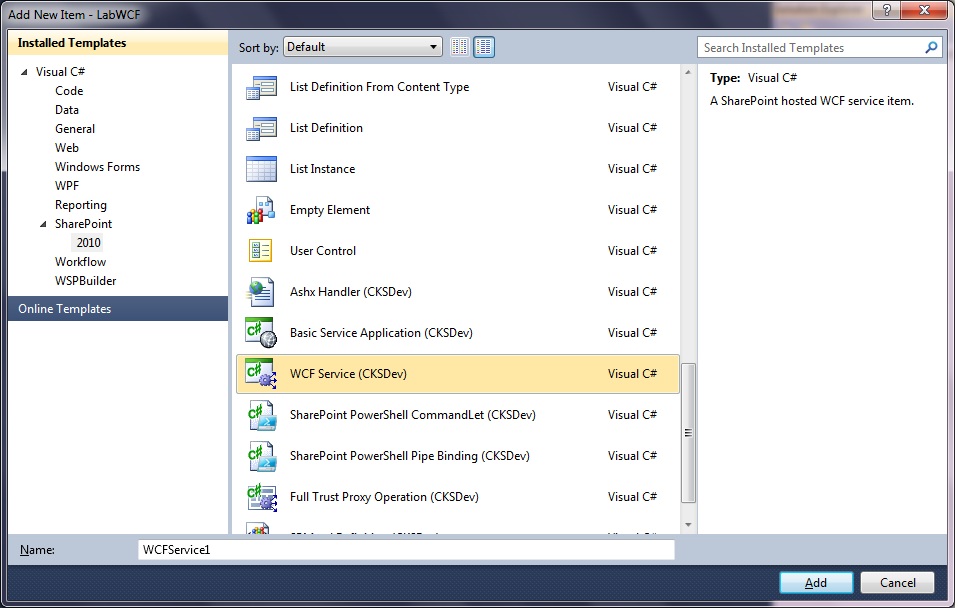
Pero cuando lo instale tuve un problema, no veía las plantillas, lo que sucede es que al ejecutar el archivo CKS.Dev.Server.vsix este instala las plantillas para el usuario que esta logueado actualmente, aaa … ya se acuerdan que siempre que ejecutamos el VisualStudio 2010 le decimos que se ejecute con otra cuenta de usuario, pues ahí esta.
Para solucionar el tema toco Windows, Cambiar de usuario e iniciar sesión en el Win7 con el usuario que es FarmAdministrator de nuestro SharePoint 2010, se ejecuto nuevamente el archivo CKS.Dev.Server.vsix y al volver a la sesión que teníamos antes ya se observaban las plantillas,
Happy Coding!!!


 Letras y Números