Modificar las propiedades de un WebPart sin usar el control de EditWebPart por defecto de SharePoint January 18, 2013
Posted by juanpablo1manrique in SharePoint, SharePoint Development.Tags: SharePoint
add a comment
Hola amigos
En esta oportunidad he tenido el atrevimiento de modificar las propiedades de un webPart desde un boton sin necesidad de utilizar el control de propiedades que trae por defecto SharePoint,
Recordemos que un WebPart esta dividido en 2 clases importantes una para la definición de WebPart que hereda de Microsoft.SharePoint.UI.WebParts.WebPart de ahora en adelante WebPartMyClass y otra que es un User Control ascx; en el caso de los WebPart visuales de ahora en adelante alias UserControlWebPartMyClass,
Para lograr salvar las propiedades de esta manera es necesario construir un metodo publico en WebPartMyClass de la siguiente manera
public void SaveCustomProperties(string val1, string val2)
{
this.Property1 = val1;
this.Property2 = val2;
this.SaveProperties = true;
this.SaveControlState();
}
El código dice más que mil palabras, 🙂
Y desde el evento de boton del ascx (UserControlWebPartMyClass) llamar este metodo que acabamos de construir de la siguiente manera
protected void Button1_Click(object sender, EventArgs e)
{
((WebPartMyClass)this.Parent).SaveCustomProperties(“val1”, “val2”);
}
Aqui el código de las 2 clases
— Clase WebPartMyClass
using System;
using System.ComponentModel;
using System.Web;
using System.Web.UI;
using System.Web.UI.WebControls;
using System.Web.UI.WebControls.WebParts;
using Microsoft.SharePoint;
using Microsoft.SharePoint.WebControls;
namespace xxxx
{
[ToolboxItemAttribute(false)]
public class Processes : WebPart
{
// Visual Studio might automatically update this path when you change the Visual Web Part project item.
private const string _ascxPath = @”~/_CONTROLTEMPLATES/yyyyy/UserControlWebPartMyClass.ascx”;
protected override void CreateChildControls()
{
Control control = Page.LoadControl(_ascxPath);
((UserControlWebPartMyClass)control).Property1 = this.Property1;
((UserControlWebPartMyClass)control).Property2 = this.Property2;
Controls.Add(control);
}
public void SaveCustomProperties(string val1, string val2)
{
this.Property1 = val1;
this.Property2 = val2;
this.SaveProperties = true;
this.SaveControlState();
}
[WebBrowsable(true), WebDisplayName(“Property1”), WebDescription(“Property1”),
Personalizable(PersonalizationScope.Shared), Category(“Custom Property”),
System.ComponentModel.DefaultValue(“”)]
public string Property1{get;set;}
[WebBrowsable(true), WebDisplayName(“Property1”), WebDescription(“Property1”),
Personalizable(PersonalizationScope.Shared), Category(“Custom Property”),
System.ComponentModel.DefaultValue(“”)]
public string Property2{get;set;}
}
}
— UserControlWebPartMyClass —
using System;
using System.Web.UI;
using System.Web.UI.WebControls;
using System.Web.UI.WebControls.WebParts;
using Microsoft.SharePoint.WebPartPages;
namespace xxxx
{
public partial class ProcessesUserControl : WebPartControl
{
protected void Page_Load(object sender, EventArgs e)
{
}
protected void Button1_Click(object sender, EventArgs e)
{
((WebPartMyClass)this.Parent).SaveCustomProperties(“val1”, “val2”);
}
}
}
Este post fue inspirado por esta duda
Register-SPWorkflowService : The underlying connection was closed January 17, 2013
Posted by juanpablo1manrique in SharePoint2013.Tags: SharePoint
2 comments
Este error me aparecio instalando Workflow 2013 SharePoint.
Register-SPWorkflowService : The underlying connection was closed: An unexpected error occurred on a receive. Client ActivityId : ee2de3e9-3f96-4a6f-96b9-321e126cc37f.
Este sucedia cuando se ejecutaba mal el commando, se arreglo utilizando la direccion completa del dominio.
Incorrecto.
Register-SPWorkflowService –SPSite “http://devPC:90/TeamSite” –WorkflowHostUri “https://devPC:12290” –AllowOAuthHttp
Correcto.
Register-SPWorkflowService –SPSite “http://devPC:90/TeamSite” –WorkflowHostUri “https://devPC.mydomain.loc:12290” –AllowOAuthHttp
Aqui puedes observer todos los detalles de la instalación
Installing and configuring workflow for SharePoint Server 2013, Step by Step
Saludos
Configuration Wizard SharePoint 2010 vs SharePoint 2013 December 10, 2012
Posted by juanpablo1manrique in SharePoint, SharePoint2013.Tags: SharePoint
add a comment
Continuando con las comparaciones
| SharePoint 2010 | SharePoint 2013 | |
Access Services 2010Allows viewing, editing, and interacting with Access Services 2010 databases in |
X | |
Access ServicesAllows viewing, editing, and interacting with Access Services databases in a browser. |
X | X |
Application Registry ServiceBackwards compatible Business Data Connectivity API. |
X | |
App Management ServiceAllows you to add SharePoint Apps from the SharePoint Store or the App Catalog. |
X | |
Business Data Connectivity ServiceEnabling this service provides the SharePoint farm with the ability to upload BDC |
X | X |
Excel Services ApplicationAllows viewing and interactivity with Excel files in a browser. |
X | X |
Lotus Notes ConnectorSearch connector to crawl the data in the Lotus Notes server. |
X | X |
Machine Translation ServicePerforms automated machine translation. |
X | |
Managed Metadata ServiceThis service provides access to managed taxonomy hierarchies, keywords and social |
X | X |
PerformancePoint Service ApplicationSupports the monitoring and analytic capabilities of PerformancePoint Services such |
X | X |
PowerPoint Conversion Service ApplicationEnables the conversion of PowerPoint presentations to various formats. |
X | |
Search Service ApplicationIndex content and serve search queries. |
X | X |
Secure Store ServiceProvides capability to store data (e.g. credential set) securely and associate it |
X | X |
State ServiceProvides temporary storage of user session data for SharePoint Server components. |
X | X |
Usage and Health data collectionThis service collects farm wide usage and health data and provides the ability to |
X | X |
User Profile Service ApplicationAdds support for My Sites, Profiles pages, Social Tagging and other social computing |
X | X |
Visio Graphics ServiceEnables viewing and refreshing of Visio Web Drawings. |
X | X |
Web Analytics Service ApplicationWeb Analytics Service Application |
X | |
Word Automation ServicesProvides a framework for performing automated document conversions. |
X | X |
Work Management Service ApplicationThis service provides task aggregation across work management systems. |
X | |
Workflow Service ApplicationThis service connects SharePoint to an external workflow service |
X |
SharePoint 2013. The site feature being activate has a dependency on hidden Site Collection scope Feature November 22, 2012
Posted by juanpablo1manrique in Install, SharePoint.Tags: install, SharePoint
add a comment
Y aqui empezamos con SharePoint 2013,
Al intentar activar el feature de Performance Point de SharePoint 2013 me aparecio este error, muy poco diciente,
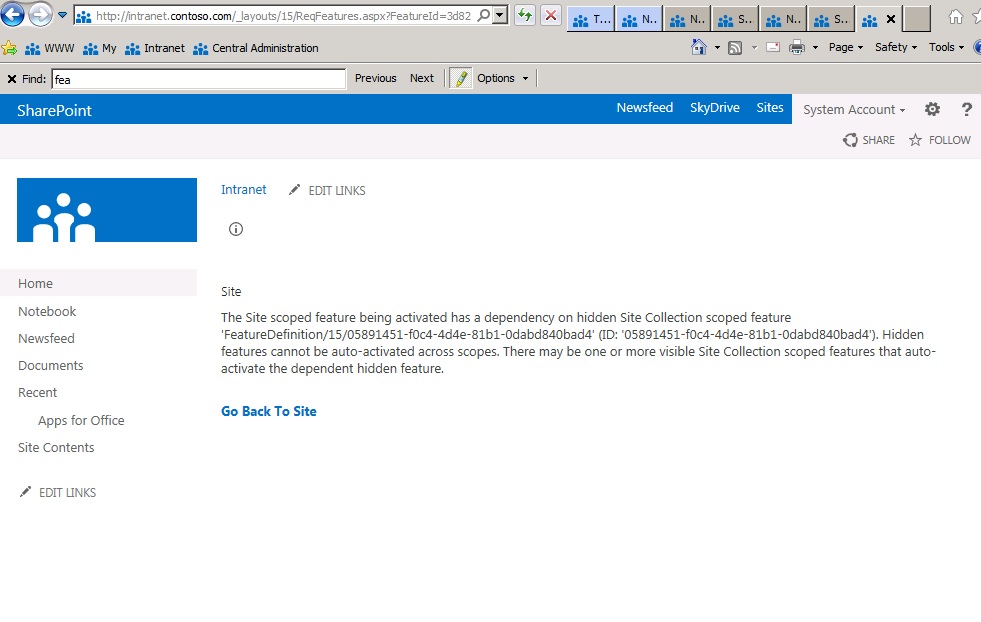
SharePoint 2013. The site feature being activate has a dependency on hidden Site Collection scope Feature ‘FeatureDefinition/15/05891451-f0c4-4d4e-81b1-0dabd840bad4’ (ID:’05891451-f0c4-4d4e-81b1-0dabd840bad4). Hidden features cannot beauto-activated across scopes. There may be one or more visible site Collection scoped features that auto-activate the dependent hidden feature.
Me puse en la tarea de ver que feature era el que estaba haciendo falta, y encontre BICenter Data Connections Feature,
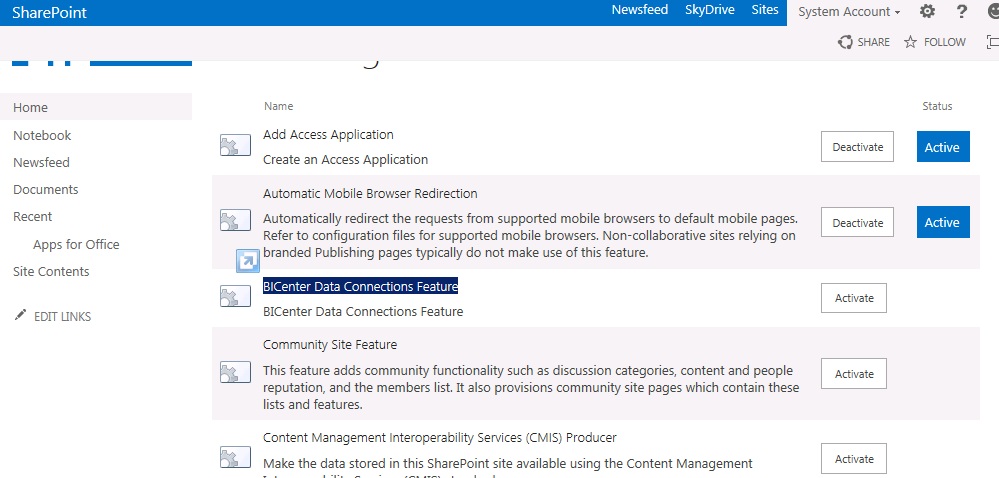
lo active y al intentar activar nuevamente el Feature de Performance Point este funciono correctamente,

Bueno eso fue todo,
saludos
Archivos ashx y asmx en Empty SharePoint Project November 22, 2012
Posted by juanpablo1manrique in SharePoint.Tags: Developer, SharePoint
add a comment
Me he encontrado con este problema al intentar agregar a un proyecto un archivo ashx y asmx en un Empty SharePoint Project, de sharepoint para que se despliegue en un archivo .wsp
- 1. Debe estar ubicado en Layouts, para lo cual debemos mapear la carpeta en el proyecto,
- 2. Una estrategia es tener un sitio web normal crear el archivo asmx o ashx y luego copiarlo y pegarlo al proyecto de sharepoint esto debido a que la opción de agregar un item no nos da la posibilidad de agregar este tipo de items
- 3. Se comnpila el proyecto y se le da deploy, al hacer esto nos encontramos con el siguiente error Could not create type ‘MyProject.Handler1’.
- 4. Para encontrar la solucion de este problema di bastantes vueltas pero lo encontre de la siguiente manera.
- a. Dentro del proyecto de Sharepoint cree un Visual Web Part el cual en la cabecera tiene una línea <%@ Assembly Name=”$SharePoint.Project.AssemblyFullName$” %>
- b.Esta línea permite que luego de hacer deploy, los archivos que quedan en 14 (C:\Program Files\Common Files\Microsoft Shared\Web Server Extensions\14\TEMPLATE\CONTROLTEMPLATES) esta linea se convierte en <%@ Assembly Name=”MyProject, Version=1.0.0.0, Culture=neutral, PublicKeyToken=7bf1drt64fd3c7da7″ %>
- c. Pero con los archivos asmx y ashx no sucede lo mismo, para este caso fue necesario tomar esta línea y agregarla directamente al archivo, al hacer esto se logro el objetivo luego de hacer deploy de la solucion la misma ya funcionaba correctamente. y es posible utilizar los servicios
Happy SharePoint Coding!!
Share Point 2010 en Windows8 September 2, 2012
Posted by juanpablo1manrique in SharePoint, Windows 8.Tags: SharePoint, Windows8
1 comment so far
Buen día amigos
Les cuento que he iniciado en el proceso de conocer Windows 8, para minimizar la cantidad de cambios que tenía que hacer instale Windows 8 sobre el mismo Windows 7 que ya tenía todas las aplicaciones instaladas y ya tenía SharePoint 2010 Instalado,
Instale Windows 8 con un archivo .ISO por medio de GIZMO para el montaje del ISO y todo funciono perfecto, lo que me evito quemar un CD con los medios,
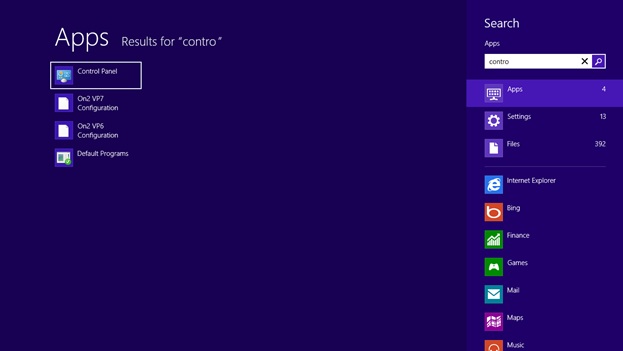
Al iniciar el proceso la primera tarea fue ingresar al Control Panel y aquí descubrí una de las primeras funcionalidades de Windows 8, se le puede dar la tecla Windows y luego escribir directamente lo que queremos y saldrá la ventana de búsqueda de aplicaciones.
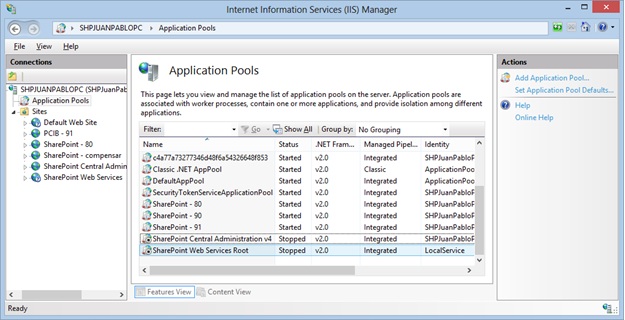
El el IIS aparecen los pool pero esta detinidos,
Al intentar iniciarlo y luego ingresar al sitio aparece este error

Y si se vuelve al IIS el pool se detiene nuevamente,
Al revisar las propiedades del usuario apareció que estaba activada la opción de “User must change password at next logon”

Le elimine la opción y le cambie la contraseña, adicionalmente verifique la opción de “Log on as a batch job” dado que se presentó este error en el eventviewer,

Para cambiar la política es necesario ingresar a la consolo mmc.exe y luego a local computer policy y agregar el usuario de servicio,

Y luego al intentar ingresar al central administrator ya ha vuelto a la vida

Pero nuestro sitio principal continuaba fallando,
Así que vamos y abrimos el web.config, aquí vemos otra de las nuevas ventanas de Windows 8,
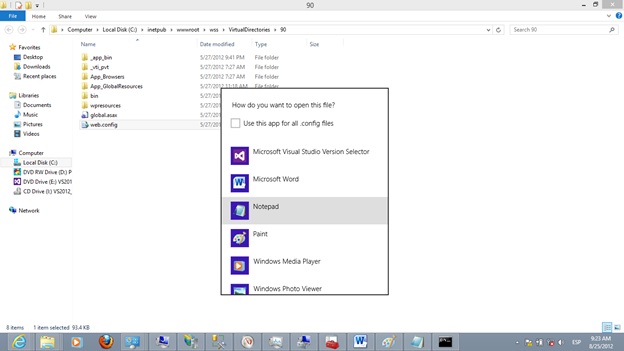
Y lo modificamos para que podamos ver los errores para nosotros los desarrolladores, con SharePoint he aprendido a querer las ventanas amarillas,
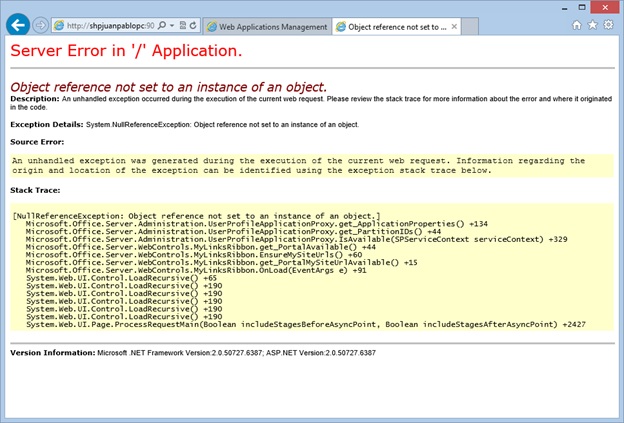
Al revisar el event viewer se encontró el siguiente error,

The identity of application pool SharePoint Central Administration v4 is invalid. The user name or password that is specified for the identity may be incorrect, or the user may not have batch logon rights. If the identity is not corrected, the application pool will be disabled when the application pool receives its first request. If batch logon rights are causing the problem, the identity in the IIS configuration store must be changed after rights have been granted before Windows Process Activation Service (WAS) can retry the logon. If the identity remains invalid after the first request for the application pool is processed, the application pool will be disabled. The data field contains the error number.
System.ServiceModel.ServiceHostingEnvironment+HostingManager/33711845
Exception: System.ServiceModel.ServiceActivationException: The service ‘/SecurityTokenServiceApplication/securitytoken.svc’ cannot be activated due to an exception during compilation. The exception message is: Exception has been thrown by the target of an invocation.. —> System.Reflection.TargetInvocationException: Exception has been thrown by the target of an invocation. —> System.ArgumentNullException: Value cannot be null.
Parameter name: certificate
Buscando En internet encontre este blog con algunas recomendaciones,
http://www.mysharepointadventures.com/2011/07/security-token-service-application-broken/
Intente correr el configuration wizard pero no funciono, así que reinicie,
Luego de mucho intentar entrar a los sitios y al central administrator logre entrar, mi sharepoint revivió,
Algo que detecte es que la consola de SQL SERVER Configuration Manager había desaparecido así que fui a buscarla en C:\Windows\SysWOW64\SQLServerManager10.msc

Al ejecutarla encontré el siguiente error
The remote procedure call failed. [0x800706be]
Al ver este error encontré que se puede descargar el service pack 2 de SQL SERVER 2008 R2 e instalarlo y esto soluciono el problema.
http://www.microsoft.com/en-us/download/details.aspx?id=30437
Espero que les sea de utilidad
Reporting Services – Sharepoint Integrated Mode vs Native August 29, 2012
Posted by juanpablo1manrique in Developer, SharePoint, SQL SERVER 2008, SSRS, VS.Tags: SharePoint, SSRS
add a comment
En esta ocasión se intento hacer una diferenciación entre los dos modos de instalación de Reporting Services cuando se integra con SharePoint 2010, fue algo complejo espero que les guste
| SharePoint Integrated Mode | SharePoint Integrated Mode Whit SQL 2008 R2 | Native 2008 | |
| SharePoint collaboration Features, alerts and version control | x | x | |
| Tener un sitio unificado para accesar y manejar tanto .rdl como otros documentos | x | x | |
| SharePoint Permissions and authentication providers | x | x | |
| Use SharePoint large deployment to internet or intranet | x | x | |
| Manage custom application page and custom masterpage to improved desing | x | x | |
| Posibility to develop custom features for custom requirements, for exmaple manage report history | x | x | |
| Report Center | x | x | |
| Publish reports and datasources directly to sharePoint library or use direct upload action | x | x | |
| SharePoint collaboration Features, deliver reports thorugh e-mail, shared folder, data-driven subscriptions using data queried at run time | Según SharePoint | Según SharePoint | Según SSRS |
| Report viewer web Part whit page navigation, search, print and export features. | x | x | |
|
Program against a new SOAP endpoint to create custom applications that integrate with a SharePoint site
|
x | x | |
|
URL addressing is different in SharePoint integrated mode
|
x | x | |
| Atom Renderer specific icon in the ReportViewer web part toolbar. | x | x | |
| Improved Report Preview experience with Report Builder 3.0 and edit sessions. | x | x | |
| 2010 End Point Proxy. | x | x | |
| Support for SharePoint ULS Logging. | x | x | |
| Local Mode for viewing reports with SharePoint List data extension. | x | x | |
| Access Reporting in local mode when Access Services is enabled. | x | x | |
| 37 languages supported including bi-directional languages (Hebrew and Arabic) and complex script languages Reporting Services web pages. | x | x | |
| Reporting Services custom security extensions | x | ||
| Report Manager | x | ||
| Linked reports | x | ||
| My Reports | x | ||
| My Subscriptions | x | ||
| Batching methods | x | ||
| Support for Multiple SharePoint Zones. | x | ||
| Rs.exe utility supports scripting with servers in SharePoint Integrated mode. | x | ||
| Support using Trusted Account authentication for SharePoint web applications using login. | x | ||
| Report Parts. | x | ||
| 2010 management endpoint. | x | ||
| Microsoft Access reporting in connected mode when Access Services is enabled. | x | ||
| Relational, multidimensional, XML, and custom data sources | x | x | x |
| Tabular, matrix, chart, and free-form report layouts | x | x | x |
| Ad hoc reports | x | x | x |
| Drillthrough reports and interactivity | x | x | x |
| Presentation formats | x | x | x |
| Custom controls and report items | x | x | x |
| bookmarks and document maps | x | x | x |
| aggregate and summarize | x | x | x |
| Graphical elements | x | x | x |
| Command-line utilities for administration | x | x | x |
| Role-based security Report Manager | Según SharePoint | Según SharePoint | Según SSRS |
| On-demand access over Web connections | x | x | x |
| Subscriptions for E-mail or File share Delivery | Según SharePoint | Según SharePoint | Según SSRS |
| Data-driven subscriptions de Reporting Services | Según SharePoint | Según SharePoint | Según SSRS |
| Report Definition Language (RDL) | x | x | x |
| URL access parameterized URL strings | x | ||
| WMI provider Report Server Windows service | x | x | x |
Se esperaria que todas las funcionalidades de una librería esten disponibles en una librería de reportes, pero estas 2 no lo estan.
- SharePoint OutLook Calendar
- Report server integration Anonymous Access
Tomado de
http://msdn.microsoft.com/en-us/library/ms159273(v=sql.105).aspx
http://msdn.microsoft.com/en-us/library/bb326290(v=sql.105).aspx
Saludos
Paso a Paso para crear un InfoPath con Submit August 2, 2012
Posted by juanpablo1manrique in InfoPath, SharePoint Development.Tags: InfoPath, SharePoint
1 comment so far
Buen día,
Aqui un proceso de creación para recordar
- En MS InfoPath Designer
- Crear un formulario Nuevo Agregar los controles necesarios
- Agregar un Botón de submit
- Publicar el formulario con la opción de Plantilla de formulario aprobada por el administrador (Avanzado)
- En SharePoint 2010 Central Administrator
- General Application Settings, Upload Form Template
- Subir la plantilla y decirle activar para la colección de sitios
- En SharePoint 2010 interface WEB Librería
- Crear un Form Library Modificar las opciones avanzadas para soportar varios tipos de contenido
- Vincular el tipo de contenido del formulario correspondiente
- Eliminar el tipo de contenido Form
- En SharePoint 2010 interface WEB User Interface
- Crear una página de visualización Agregar un web.part de Formularios InfoPath Form Web Part
- Vincular el formulario correspondiente
- En MS InfoPath Designer
- Volver al archivo de InfoPath .xsn Realizar una conexión de envío de datos apuntando a la librería creada anteriormente
- Ir a archivo opciones de envío y verificar que tomo la conexión de envío de datos creada
- En opciones de envío ir a Avanzadas y agregar un mensaje de enviado correctamente
- En el botón de envío dentro del layout del formulario ir a propiedades y asegurarse que ejecute la opción enviar
- Volver a publicar el formulario
- En SharePoint 2010 Central Administrator
- General Application Settings, Upload Form Template
- Subir la plantilla y ya no hay necesidad de activar
- En SharePoint 2010 interface WEB User Interface
- Realizar las pruebas correspondientes
Happy code.
After Install CKSDEV I don´t see the WCF Service (CKSDev) June 23, 2012
Posted by juanpablo1manrique in Developer, SharePoint.Tags: Developer, SharePoint
add a comment
Bueno amigos
El día de hoy conocí un AddIn para VisualStudio que trae algunas plantillas de desarrollo bastante interesantes
CKS – Development Tools Edition (Server) http://visualstudiogallery.msdn.microsoft.com/ee876627-962c-4c35-a4a6-a4d89bfb61dc/
La cual nos puede facilitar la vida para desarrollar algunos tipos de proyectos para SharePoint 2010.
Por lo general para crear un proyecto de SharePoint que implemente un WCF tenemos que realizar un proceso similar a este.
http://nikspatel.wordpress.com/2012/02/29/step-by-step-building-custom-wcf-services-hosted-in-sharepoint-part-i/ http://blah.winsmarts.com/2010-3-Video__Telerik_Silverlight_Chart_showing_live_data_from_SharePoint_2010.aspx
Pero con CKSDEV es mucho más fácil
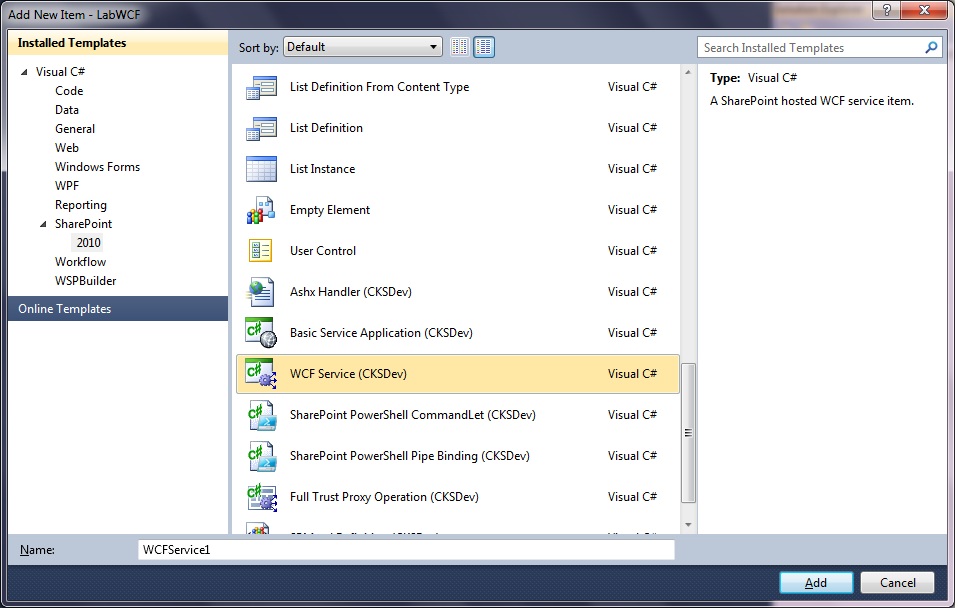
Pero cuando lo instale tuve un problema, no veía las plantillas, lo que sucede es que al ejecutar el archivo CKS.Dev.Server.vsix este instala las plantillas para el usuario que esta logueado actualmente, aaa … ya se acuerdan que siempre que ejecutamos el VisualStudio 2010 le decimos que se ejecute con otra cuenta de usuario, pues ahí esta.
Para solucionar el tema toco Windows, Cambiar de usuario e iniciar sesión en el Win7 con el usuario que es FarmAdministrator de nuestro SharePoint 2010, se ejecuto nuevamente el archivo CKS.Dev.Server.vsix y al volver a la sesión que teníamos antes ya se observaban las plantillas,
Happy Coding!!!
Como Habilitar/Deshabilitar Windows Error Reporting y el manejo de archivos HDMP\MDMP May 27, 2012
Posted by juanpablo1manrique in SharePoint.Tags: install, SharePoint
1 comment so far
No te ha pasado que de repente tu servidor de sharepoint 2010 deja de funcionar correctamente, y al revisar se ha quedado sin espacio, en el disco C:. Esto sucede porque Windows Error Reporting esta habilitado. Esta funcionalidad hace que cada vez que se genere un error se genere un archivo HDMP con toda la información del error que se genero cuando una aplicación ha fallado, tambien se genera un archivo MDMP con toda la información comprimida de la memoria DUMP de cuando sucedio el error.
Toda esta información es utilizada cuando se decide enviar los errores a microsoft, pero el espacio utilizado no es liberado.
Para chequear esto no esta sucediendo en nuestro servidor debemos mirar la carpeta
Windows 2003, win XP
C:\WINDOWS\pchealth\ERRORREP\UserDumps
Windows 2008, win 7
C:\DOCUME~1\USER~1\LOCALS~1\Temp\WER8bd7.dir00\w3wp.exe.mdmp
C:\ProgramData\Microsoft\Windows\WER\ReportArchive
C:\ProgramData\Microsoft\Windows\WER\ReportQueue
C:\Users\UserProfileName\AppData\Local\Microsoft\Windows\WER\ReportArchive
C:\Users\UserProfileName\AppData\Local\Microsoft\Windows\WER\ReportQueue
Donde encontraremos archivos del tipo
w3wp.exe{time}.mdmp
w3wp.exe{time}.hdmp
Podemos desabilitar esta opción de la siguiente manera
Windows 2003, Win XP
1. Click derecho “My Computer” y click en propiedades
2. Click en advanced y seleccionar “Error reporting”
3. Seleccionar Deshabilitar
4. Se pueden habilitar solo las aplicaciones que queramos que reporten
Windows 2008, Win 7 regedit
Entrar al regedit
HKEY_LOCAL_MACHINE\SOFTWARE\Microsoft\Windows\Windows Error Reporting\
y agregar la instruccion
Disabled (dword) 1 (hex)
Windows 2008, Win 7 Visualmente
1. Click derecho “My Computer” y click en propiedades
2. Click en advanced y seleccionar “¨Performance” -> settings
3. Click en “Data Execution Prevention”
4. Turn on DEP for essencial windows programs and services only.
Para mayor información pueden consultar
http://blogs.technet.com/b/yongrhee/archive/2010/12/29/drwtsn32-on-windows-vista-windows-server-2008-windows-7-windows-server-2008-r2.aspx
http://www.mywebhostingblog.net/aspnet-web-hosting/windows-error-reporting/
http://www.windowsreference.com/general/how-to-enabledisable-windows-error-reporting-and-handle-hdmpmdmp-files/


 Letras y Números
