assembly fill complex type by reflection December 15, 2014
Posted by juanpablo1manrique in SharePoint.add a comment
The code say everything
string dllName = “Mycomponent.dll”;
string typeEntityName = “Mycomponent.DBEntity”;
Assembly assembly = Assembly.LoadFrom(“C:\\” + dllName);
Type typeEntity = assembly.GetType(typeEntity);
object objByreflection = Activator.CreateInstance(typeEntityName);
//ahora la magia
PropertyInfo pinfoprop1 = typeEntity.GetProperty(“prop1”);
pinfoprop1.SetValue(objByreflection, value1, null);
PropertyInfo pinfoprop2 = typeEntity.GetProperty(“prop2”);
pinfoprop2.SetValue(objByreflection, value2, null);
return objByreflection;
I can’t see “Access Request Settings” December 3, 2014
Posted by juanpablo1manrique in SharePoint.add a comment
Esta opción se ve en Site setting -> site permissions -> click. En el ribbon en la parte superior.
Hay ocasiones en las que no se observa debido a que no se ha configurado la cuenta de correo saliente en sharepoint.
Central Administrator -> System Settings -> configure outgoing email settings -> click, colocar un correo asi sea de pruebas.
The following URL is not valid: http://team.contoso.com November 28, 2014
Posted by juanpablo1manrique in InfoPath.Tags: InfoPath
add a comment
The following URL is not valid: http://team.contoso.com
Este es un error que se produce en InfoPath en el momento de publicar un formulario a SharePoint, para muchos curiosos me imagino que intentaron agregar la URL como Trusted URL de InfoPath pero seguramente recibieron este error
Path You Have Entered Cannot Be Used As A Trusted Location For Security Reasons
cual es la causa,
Simple: InfoPath no funciona con Host-Named SiteCollections
Para solucionarlo es necesario utilizar un site collection sin la funcionalidad de Host-Named 😦
always return deferred resolved July 28, 2014
Posted by juanpablo1manrique in SharePoint2013.Tags: javascript, jquery, SharePoint
add a comment
En jquery existen las promesas,
Te prometo que te llevo a miami .. jejeje
ante dudas con el tema
http://joseoncode.com/2011/09/26/a-walkthrough-jquery-deferred-and-promise/
function getPrintingStatus(){
var deferred = $.Deferred();
if {isNecesaryPrint}
{
$.post(
“/echo/json/”,
{
json: JSON.stringify( {status: Math.floor(Math.random()*8+1)} ),
delay: 2
}
).done(function(s){
deferred.resolve(s.status);
}).fail(deferred.reject);
return d.promise();
}
else {
return null;
}
}
Es decir si no es necesario imprimir no me prometa nada, digame que no,
si se envia un null y la capa superiro esperaba un deferred se arroja un error o se estanca el proseso porque la promesa nunca se cumplio, entonces hay que decir que si.
return $.when()
or
var deferred = $.Deferred().resolve();
return deferred.promise();
es decir queda como
function getPrintingStatus(){
var deferred = $.Deferred();
if {isNecesaryPrint}
{
$.post(
“/echo/json/”,
{
json: JSON.stringify( {status: Math.floor(Math.random()*8+1)} ),
delay: 2
}
).done(function(s){
deferred.resolve(s.status);
}).fail(deferred.reject);
return d.promise();
}
else {
return $.when()
}
}
Saludos
The certificate that was used has a trust chain that cannot be verified. Replace the certificate or change the certificateValidationMode April 11, 2014
Posted by juanpablo1manrique in Windows 2008, Windows 2012.Tags: ADFS, SharePoint
add a comment
El Error
The X.509 certificate CN=ADFS Signing – myadfs.mydomain.loc is not in the trusted people store. The X.509 certificate CN=ADFS Signing – myadfs.mydomain.loc chain building failed. The certificate that was used has a trust chain that cannot be verified. Replace the certificate or change the certificateValidationMode. A certificate chain processed, but terminated in a root certificate which is not trusted by the trust provider.
Este error se presenta por la falta de
<certificateValidation certificateValidationMode=”None” />
Y que la dirección
<add thumbprint=”4D8781tttytyttC83DD8B7088C769287″ name=”https://myadfs.mydomain.loc/adfs/services/trust” />
estaba http y no https
Salud2
Error: An error occured while trying to fetch data from your Sharepoint site. Unexpected response from the server. The content type of the response is “”. The status code is “OK” February 24, 2014
Posted by juanpablo1manrique in SharePoint.add a comment
Este error se puede presentar por las siguientes causas:
- En el IIS -> Autentication -> Windows Authentication -> providers no exite el proveedor NTLM
- En los bindings del IIS existen varios bindings por diferentes puertos, recomendable tener uno solo
- El DisableLoopbackCheck no se ha deshabilitado
- Se agregaron modificaciones sobre el TAG, system.serviceModel los cuales sobreescriben el comportamiento del servicio client.svc, recomendable que vaya vacio, tal cual viene en SharePoint
<system.serviceModel>
<serviceHostingEnvironment aspNetCompatibilityEnabled=”true” />
</system.serviceModel>
- Site Settings -> Site Collection Administration -> SharePoint Designer Settings esta deshabilitado
- Se esta intentando ingresar por una URL que no existe en Central Administration -> System Settings -> Configure alternate access mappings
- La autenticacion Windows del sitio esta deshabilitada
Saludos
window.navigator.geolocation undefined January 29, 2014
Posted by juanpablo1manrique in SharePoint.add a comment
Cuando se tiene un error de este tipo en SharePoint 2010
Se Deben realizer las siguientes acciones.
En la masterPage verificar que no exista el tag <meta http-equiv=”X-UA-Compatible” content=”IE=8″/>
y en el web.Config agregar
<add name=”X-UA-Compatible” value=”IE=edge” />
En
- <httpProtocol>
- <customHeaders>
- <add name=”X-MS-InvokeApp” value=”1; RequireReadOnly” />
- <add name=”X-UA-Compatible” value=”IE=edge” />
- </customHeaders>
- </httpProtocol>
Calentando SharePoint – Warm Up December 3, 2013
Posted by juanpablo1manrique in SharePoint.Tags: SharePoint
add a comment
A muchos les a pasado que por la manana SharePoint siempre en el primer request amance super lento. Se puede crear una rutina en power shell que llamada desde el task manager de uno de los WFE de SharePoint, realice una actividad de calentamiento de SharePoint.
Se crea un archivo Calentamiento.ps1 y se agregan las siguientes lineas
$webclient = New-Object System.Net.WebClient
$webclient.Credentials = [System.Net.CredentialCache]::DefaultCredentials
$webclient.DownloadString(http://mymadrugonsharepointsite)
Se crea la tarea programada a eso de las 7:30am y listo
Saludos
A listener channel for protocol ‘http’ in worker process ‘XXXX’ serving application pool ‘.NET v4.5’ reported a listener channel failure. The data field contains the error number. November 6, 2013
Posted by juanpablo1manrique in Developer.Tags: .NET, Developer
add a comment
Buen día
En estos días se me presento un error en un Windows Server 2012, inicialmente el sitio que estaba instalando desplegaba error 503, yel pool de aplicacion se detenia, al investigar un poco en el event viewer, seccion system aparecio …
A listener channel for protocol ‘http’ in worker process ‘XXXX’ serving application pool ‘.NET v4.5’ reported a listener channel failure. The data field contains the error number.
El error se presentaba cuando intentaba configurar una aplicacion que se encontraba en x64 y la intetaba mover a x32

El error se debia a que en ese servidor se encontraba instalado SharePoint y cierta configuración del mismo interferia con las aplicaciones .NET normales
fue necesario
Ingresar al archivo applicationhost.config ubicado en %WinDir%\System32\Inetsrv\Config, al abrirlo buscar
<add name=”SPNativeRequestModule” image=”C:\Program Files\Common Files\Microsoft Shared\Web Server Extensions\15\isapi\spnativerequestmodule.dll” />
Editar esta llave y agregarle preCondition=”bitness64″
<add name=”SPNativeRequestModule” image=”C:\Program Files\Common Files\Microsoft Shared\Web Server Extensions\15\isapi\spnativerequestmodule.dll” preCondition=”bitness64″ />
Con esto ya se soluciono
Tambien es recomendable verificar que si se tiene RPC over HTTP Proxy instalado verificar que la llave PasswordExpiryModule tambien incluya el preCondition=”bitness64″
<add name=”PasswordExpiryModule” image=”%SystemRoot%\system32\rpcproxy\rpcproxy.dll” preCondition=”bitness64″ />
Saludos
Change EPT Project Server August 20, 2013
Posted by juanpablo1manrique in SharePoint.Tags: ProjectServer
add a comment
Hola,
Para cambiar el Enterprise Project Type existen algunas opciones para realizar esta acción,
con workflow

sin workflow
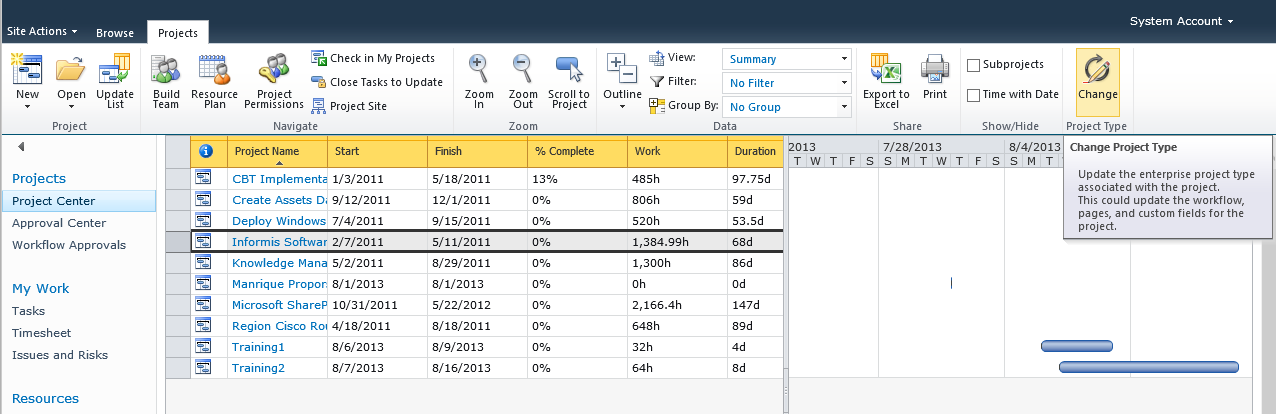
Saludos


 Letras y Números