Error:You must specify a value for this required field July 14, 2012
Posted by juanpablo1manrique in SharePoint.1 comment so far
Error:You must specify a value for this required field
Este error se presenta cuando se intenta modificar una página de Wiki desde el explorador, el origen de este error es el master.page
Correcto
- <h2 style=”visibility:hidden;”>
- <div style=”visibility:hidden;display:inline”>
- <asp:ContentPlaceHolder id=”PlaceHolderPageTitleInTitleArea” runat=”server” Visible=”true” />
- </div>
- </h2>
- <div tabindex=”0″ >
- <div style=”visibility:hidden;display:inline”>
- <asp:ContentPlaceHolder id=”PlaceHolderPageDescription” runat=”server” Visible=”true” />
- </div>
- </div>
Incorrecto
- <h2> <asp:ContentPlaceHolder id=”PlaceHolderPageTitleInTitleArea” runat=”server” Visible=”false” /></h2>
- <div tabindex=”0″ >
- <asp:ContentPlaceHolder id=”PlaceHolderPageDescription” runat=”server” Visible=”false” />
- </div>
Se debe evitar manipular la propiedad visible=”false” de todos los ContentPlaceHolder del master page
Other content placeholder’s in the v4.master MasterPage to be aware of:
| PlaceHolderPageTitle | PlaceHolderAdditionalPageHead | PlaceHolderAdditionalPageHead |
| PlaceHolderBodyAreaClass | PlaceHolderTitleAreaClass | PlaceHolderGlobalNavigation |
| PlaceHolderTitleBreadcrumb | PlaceHolderGlobalNavigationSiteMap | PlaceHolderSiteName |
| PlaceHolderPageTitleInTitleArea | PlaceHolderPageDescription | PlaceHolderSearchArea |
| PlaceHolderTopNavBar | PlaceHolderHorizontalNav | PlaceHolderLeftNavBarDataSource |
| PlaceHolderCalendarNavigator | PlaceHolderLeftActions | PlaceHolderLeftNavBarTop |
| PlaceHolderLeftNavBar | PlaceHolderQuickLaunchTop | PlaceHolderQuickLaunchBottom |
| PlaceHolderQuickLaunchBottomV3 | PlaceHolderQuickLaunchBottomV4 | PlaceHolderPageImage |
| PlaceHolderTitleLeftBorder | PlaceHolderMiniConsole | PlaceHolderTitleRightMargin |
| PlaceHolderTitleAreaSeparator | PlaceHolderNavSpacer | PlaceHolderLeftNavBarBorder |
| PlaceHolderBodyLeftBorder | PlaceHolderMain | PlaceHolderBodyRightMargin |
| PlaceHolderFormDigest | PlaceHolderUtilityContent | SPNavigation |
| WSSDesignConsole |
SharePoint 2010 Foundation Vs Standard Vs Enterprise June 27, 2012
Posted by juanpablo1manrique in SharePoint.2 comments
Esta es una información que esta disponible en Microsoft pero que yo por mi parte no quiero olvidar, así que aqui se las comparto Forever.
| Foundation | Standard | Enterprise |
| Accessibility | Ask Me About | Access Services |
| Blogs | Audience Targeting | Advanced Content Processing |
| Browser-based Customizations | Basic Sorting | Advanced Sorting |
| Business Connectivity Services | Best Bets | Business Data Integration with the Office Client |
| Business Data Connectivity Service | Business Connectivity Services Profile Page | Business Data Web Parts |
| Claims-Based Authentication | Click Through Relevancy | Business Intelligence Center |
| Client Object Model (OM) | Colleague Suggestions | Calculated KPIs |
| Configuration Wizards | Colleagues Network | Chart Web Parts |
| Connections to Microsoft Office Clients | Compliance Everywhere | Contextual Search |
| Connections to Office Communication Server and Exchange | Content Organizer | Dashboards |
| Cross-Browser Support | Document Sets | Data Connection Library |
| Developer Dashboard | Duplicate Detection | Decomposition Tree |
| Discussions | Enterprise Scale Search | Deep Refinement |
| Event Receivers | Enterprise Wikis | Excel Services |
| External Data Column | Federated Search | Excel Services and PowerPivot for SharePoint |
| External Lists | Improved Governance | Extensible Search Platform |
| High-Availability Architecture | Keyword Suggestions | Extreme Scale Search |
| Improved Backup and Restore | Managed Metadata Service | InfoPath Forms Services |
| Improved Setup and Configuration | Memberships | PerformancePoint Services |
| Language Integrated Query (LINQ) for SharePoint | Metadata-driven Navigation | Rich Web Indexing |
| Large List Scalability and Management | Metadata-driven Refinement | Similar Results |
| Managed Accounts | Mobile Search Experience | Thumbnails and Previews |
| Mobile Connectivity | Multistage Disposition | Tunable Relevance with Multiple Rank Profiles |
| Multilingual User Interface | My Content | Visio Services |
| Multi-Tenancy | My Newsfeed | Visual Best Bets |
| Out-of-the-Box Web Parts | My Profile | |
| Patch Management | Note Board | Includes Foundation and Standard Features |
| Permissions Management | Organization Browser | |
| Photos and Presence | People and Expertise Search | |
| Quota Templates | Phonetic and Nickname Search | |
| Read-Only Database Support | Query Suggestions, “Did You Mean?”, and Related Queries | |
| Remote Blob Storage (SQL Feature) | Ratings | |
| REST and ATOM Data Feeds | Recent Activities | |
| Ribbon and Dialog Framework | Recently Authored Content | |
| Sandboxed Solutions | Relevancy Tuning | |
| SharePoint Designer | Rich Media Management | |
| SharePoint Health Analyzer | Search Scopes | |
| SharePoint Lists | Secure Store Service | |
| SharePoint Ribbon | Shared Content Types | |
| SharePoint Service Architecture | SharePoint 2010 Search Connector Framework | |
| SharePoint Timer Jobs | Status Updates | |
| SharePoint Workspace | Tag Clouds | |
| Silverlight Web Part | Tag Profiles | |
| Site Search | Tags | |
| Solution Packages | Tags and Notes Tool | |
| Streamlined Central Administration | Unique Document IDs | |
| Support for Office Web Apps | Web Analytics | |
| Unattached Content Database Recovery | Windows 7 Search | |
| Usage Reporting and Logging | Word Automation Services | |
| Visual Studio 2010 SharePoint Developer Tools | Workflow Templates | |
| Visual Upgrade | ||
| Web Parts | Includes Foundation Features | |
| Wikis | ||
| Windows 7 Support | ||
| Windows PowerShell Support | ||
| Workflow | ||
| Workflow Models |
Esta información esta disponible en http://sharepoint.microsoft.com/en-us/buy/pages/editions-comparison.aspx
Script de apertura de puertos SQL SERVER 2008 June 27, 2012
Posted by juanpablo1manrique in SharePoint.add a comment
Hola Amigos
Encontre este articulo super util y que nunca debemos olvidar de como programar adecuadamente los puertos de entrada salida, necesarios para instalar correctamente SQL SERVER 2008.
@echo =========  SQL Server Ports  ===================
@echo Enabling SQLServer default instance port 1433
netsh firewall set portopening TCP 1433 "SQLServer"
@echo Enabling Dedicated Admin Connection port 1434
netsh firewall set portopening TCP 1434 "SQL Admin Connection"
@echo Enabling conventional SQL Server Service Broker port 4022
netsh firewall set portopening TCP 4022 "SQL Service Broker"
@echo Enabling Transact-SQL Debugger/RPC port 135
netsh firewall set portopening TCP 135 "SQL Debugger/RPC"
@echo =========  Analysis Services Ports  ==============
@echo Enabling SSAS Default Instance port 2383
netsh firewall set portopening TCP 2383 "Analysis Services"
@echo Enabling SQL Server Browser Service port 2382
netsh firewall set portopening TCP 2382 "SQL Browser"
@echo =========  Misc Applications  ==============
@echo Enabling HTTP port 80
netsh firewall set portopening TCP 80 "HTTP"
@echo Enabling SSL port 443
netsh firewall set portopening TCP 443 "SSL"
@echo Enabling port for SQL Server Browser Service's 'Browse' Button
netsh firewall set portopening UDP 1434 "SQL Browser"
@echo Allowing multicast broadcast response on UDP (Browser Service Enumerations OK)
netsh firewall set multicastbroadcastresponse ENABLE
Es importante siempre configurar los puertos de acceso, y evitar abrir todos los puertos, o bajar el firewall,
After Install CKSDEV I don´t see the WCF Service (CKSDev) June 23, 2012
Posted by juanpablo1manrique in Developer, SharePoint.Tags: Developer, SharePoint
add a comment
Bueno amigos
El día de hoy conocí un AddIn para VisualStudio que trae algunas plantillas de desarrollo bastante interesantes
CKS – Development Tools Edition (Server) http://visualstudiogallery.msdn.microsoft.com/ee876627-962c-4c35-a4a6-a4d89bfb61dc/
La cual nos puede facilitar la vida para desarrollar algunos tipos de proyectos para SharePoint 2010.
Por lo general para crear un proyecto de SharePoint que implemente un WCF tenemos que realizar un proceso similar a este.
http://nikspatel.wordpress.com/2012/02/29/step-by-step-building-custom-wcf-services-hosted-in-sharepoint-part-i/ http://blah.winsmarts.com/2010-3-Video__Telerik_Silverlight_Chart_showing_live_data_from_SharePoint_2010.aspx
Pero con CKSDEV es mucho más fácil
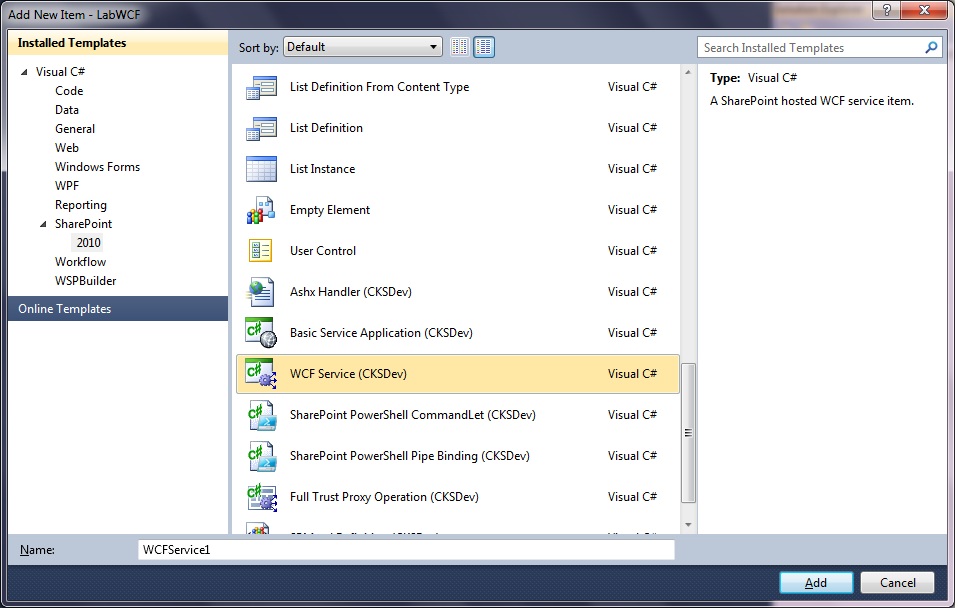
Pero cuando lo instale tuve un problema, no veía las plantillas, lo que sucede es que al ejecutar el archivo CKS.Dev.Server.vsix este instala las plantillas para el usuario que esta logueado actualmente, aaa … ya se acuerdan que siempre que ejecutamos el VisualStudio 2010 le decimos que se ejecute con otra cuenta de usuario, pues ahí esta.
Para solucionar el tema toco Windows, Cambiar de usuario e iniciar sesión en el Win7 con el usuario que es FarmAdministrator de nuestro SharePoint 2010, se ejecuto nuevamente el archivo CKS.Dev.Server.vsix y al volver a la sesión que teníamos antes ya se observaban las plantillas,
Happy Coding!!!
Comandos Power Shell Utiles May 27, 2012
Posted by juanpablo1manrique in SharePoint.4 comments
- Consultar todas las templates instaladas
- $web.webtemplate | format-list
- to file
- $list.items | Out-File C:\filename.txt
- Reduce WSS_Logging
- $defs = Get-SPUsageDefinition
Foreach($def in $defs)
{
Set-SPUsageDefinition –Identity $def.Name –DaysRetained 1
}
- $defs = Get-SPUsageDefinition
- Query with Row Line number
- SELECT TOP 10 ROW_NUMBER() OVER (Order by [col1]) AS RowNumber,[col1]
FROM [dbo].[Table]
- SELECT TOP 10 ROW_NUMBER() OVER (Order by [col1]) AS RowNumber,[col1]
- excel arrow moves sheet not cell
- Windows
- On-Screen Keyboard
- When the on-screen keyboard appears, click the ScrLk or Slk button
- WSDL.exe
- WSDL.exe /language:CS /namespace:FourCalc /out:c:\Captures\FourCalc.cs http:\\localhost/FourFunctionCalc/Service1.asmx?sdl
- psconfig -cmd upgrade -inplace b2b
- read PublicKeyToken> en power shell
- ([system.reflection.assembly]::loadfile(“c:\MyVerificationDLL.dll”)).FullName
- PrerequisiteInstaller.exe /?
- Muestra los prerequisitos de esa versión
- Broacast skype 365 URL
- Borrar usuarios
- Get-SPUser -web http://www.misite.com -Limit ALL | Where-Object {$_.UserLogin -like “*fuckuser*”} | select UserLogin
- $user = Get-SPUser -web http://www.misite.com -identity “i:0#.f|sql_membership|fuckuser”
- Remove-SPUser -identity $user.ID -web http://www.misite.com
- Connect SharePoint Online
- Connect-SPOService -Url https://tenantname-admin.sharepoint.com -credential admin@contoso.com
- Allow MimeType
- $webApp = Get-SPWebApplication http://sharepoint.contoso.co
- # current allowed mimetypes
- $webApp.AllowedInlineDownloadedMimeTypes
- # add the text/html mime type
- $webApp.AllowedInlineDownloadedMimeTypes.Add(‘text/html’)
- $webApp.Update()
- Set Office 365 never expires
- Set-MsolUser -UserPrincipalName “userprincipalname” –PasswordNeverExpires $true
- MicrosoftEasyFix20150
- fix sync issues with OneDrive for Business automatically
- Get all assembly
- gacutil -l >yourassemblies.txt
- CamlQuery query = CamlQuery.CreateAllItemsQuery()
- CamlQuery query = CamlQuery.CreateAllItemsQuery(100)
- URL view all users
- …/_layouts/15/people.aspx?MembershipGroupId=0
- Otorgar permisos a la base de datos de configuración
-
- Add-SPShellAdmin aaa\bbbb
-
- Manage property bags
- $web = GEt-spweb “http://www.misite.com/subsite/”
- $web.Properties[“prop1”] = “88888”
- $web.Properties[“prop2”] = “0010”
- $web.Properties.Update();
- $web.Update();
- Shutdown . Apagar por comandos
- shutdown /r /t 0
- Copy Paste error
- rdpclip.exe
- Obtener el listado de listas de un sitio
- $web = GET-SPWeb “http://site/subsite/subsite/
- $web.lists | Format-Table title,id -AutoSize
- PowerShell
- add-PSSnapIn “Microsoft.SharePoint.Powershell”
- Crear sitio de Educacion
- New-SPEduClass –ClassId SPEU101 –ClassName “ElectronicaI” –site http://education.contoso.com
- Upgrade several sitecollections
- get-spsite -limit all | Upgrade-SPSite -VersionUpgrade -Unthrott
- Computer Management
- compmgmt.msc
- Sincronizar el reloj HORA
- w32tm /resync
- Usage Logs
- _layouts/usagedetails.aspx
- Activar Features en el web
- Get-SPSite http://misitio/ | Get-SPWeb -Limit ALL |%{ Get-SPFeature -Web $_ } | Select DisplayName,ID -Unique
- Enable-SPFeature -identity “9a447926-5937-44cb-857a-d3829301c73b” -URL http://misitio/
- Activar Features en el site
- Get-SPFeature -Limit ALL | Where-Object {$_.Scope -eq “SITE”}
- Enable-SPFeature -identity “9a447926-5937-44cb-857a-d3829301c73b” -URL http://misitio/
- Administrar Tipos de Contenido Huerfanos
- SELECT [SiteId],[Class],[Scope],sys.fn_varbintohexstr([ContentTypeId]) as CT,[Version],[NextChildByte],[Size],[Definition],[ResourceDir],[IsFromFeature]FROM [dbo].[ContentTypes]where (sys.fn_varbintohexstr(ContentTypeId) LIKE ‘0x010010bd6c5%’)
- Update [dbo].[ContentTypes]set [IsFromFeature] = 0where (sys.fn_varbintohexstr(ContentTypeId) LIKE ‘0x010010bd6c5%’)
- delete [dbo].[ContentTypes]where (sys.fn_varbintohexstr(ContentTypeId) LIKE ‘0x010010bd6c5%’)
- Elevarse permisos en SQL SERVER
- SQLCMD –E -S ‘Domain\Account’
- exec sp_addsrvrolemember @loginame=’Domain\Account’,@rolename=’sysadmin’
- Reiniciar servico SQL SERVER
- Comando para un copiar-pegar inteligente
- xcopy “E:\Source\MyProject\styles\*.*” “E:\Destine\MyProject\styles\*.*” /EXCLUDE:C:\FileList.txt /d/e/y/i
- Obtener el listado de archivos de un folder con subfolders
- dir /s /b>FileList.txt
- Borrar una lista corrupta
- $web = get-spweb -Identity http://sp2010
- $web.lists | select Title
- $list = $web.lists[“corrupted list name”]
- $list.AllowDeletion = $true
- $list.Update()
- $list.Delete()
- — reset the logging thresholds loggin SharePoint
- stsadm -o setlogginglevel -category IRM -default
- Get-SPLogLevel | Clear-SPLogLevel
- to windows config hour sinchronize whit DC
- w32tm /query /status
- w32tm /resync
- w32tm /config /syncfromflags:manual /manualpeerlist: [lista] , donde [lista] son los nombres DNS o IP de los servidores con los que se debe sincronizar, separados por comas
- Get AD usuarios con un dato especifico
- Get-ADUser -filter {employeeID -like “*” }| Get-ADObject -properties employeeid | Format-List name,employeeid
- Actualizar un parametro con un CSV usuarios de AD
- Import-CSV C:\test.csv | foreach { Set-ADUser $_.username -EmployeeID $_.id }
- SQL Commands
- NOT LIKE ‘%[^0-9]%’ isnumeric dont work for e or d
- http://www.sqlservercentral.com/articles/IsNumeric/71512/
- IIS Commands enable Rastreo de procesos del Pool
- cd C:\Windows\System32\inetsrv
- appcmd list wp
- appcmd list wps /apppool.name:DefaultAppPool
- IIS 7.0 -> Root -> Worker Process “Procesos de Trabajo” -> Select -> ver solicitudes actuales
- IIS 6.0 cscript iisapp.vbs
Como Habilitar/Deshabilitar Windows Error Reporting y el manejo de archivos HDMP\MDMP May 27, 2012
Posted by juanpablo1manrique in SharePoint.Tags: install, SharePoint
1 comment so far
No te ha pasado que de repente tu servidor de sharepoint 2010 deja de funcionar correctamente, y al revisar se ha quedado sin espacio, en el disco C:. Esto sucede porque Windows Error Reporting esta habilitado. Esta funcionalidad hace que cada vez que se genere un error se genere un archivo HDMP con toda la información del error que se genero cuando una aplicación ha fallado, tambien se genera un archivo MDMP con toda la información comprimida de la memoria DUMP de cuando sucedio el error.
Toda esta información es utilizada cuando se decide enviar los errores a microsoft, pero el espacio utilizado no es liberado.
Para chequear esto no esta sucediendo en nuestro servidor debemos mirar la carpeta
Windows 2003, win XP
C:\WINDOWS\pchealth\ERRORREP\UserDumps
Windows 2008, win 7
C:\DOCUME~1\USER~1\LOCALS~1\Temp\WER8bd7.dir00\w3wp.exe.mdmp
C:\ProgramData\Microsoft\Windows\WER\ReportArchive
C:\ProgramData\Microsoft\Windows\WER\ReportQueue
C:\Users\UserProfileName\AppData\Local\Microsoft\Windows\WER\ReportArchive
C:\Users\UserProfileName\AppData\Local\Microsoft\Windows\WER\ReportQueue
Donde encontraremos archivos del tipo
w3wp.exe{time}.mdmp
w3wp.exe{time}.hdmp
Podemos desabilitar esta opción de la siguiente manera
Windows 2003, Win XP
1. Click derecho “My Computer” y click en propiedades
2. Click en advanced y seleccionar “Error reporting”
3. Seleccionar Deshabilitar
4. Se pueden habilitar solo las aplicaciones que queramos que reporten
Windows 2008, Win 7 regedit
Entrar al regedit
HKEY_LOCAL_MACHINE\SOFTWARE\Microsoft\Windows\Windows Error Reporting\
y agregar la instruccion
Disabled (dword) 1 (hex)
Windows 2008, Win 7 Visualmente
1. Click derecho “My Computer” y click en propiedades
2. Click en advanced y seleccionar “¨Performance” -> settings
3. Click en “Data Execution Prevention”
4. Turn on DEP for essencial windows programs and services only.
Para mayor información pueden consultar
http://blogs.technet.com/b/yongrhee/archive/2010/12/29/drwtsn32-on-windows-vista-windows-server-2008-windows-7-windows-server-2008-r2.aspx
http://www.mywebhostingblog.net/aspnet-web-hosting/windows-error-reporting/
http://www.windowsreference.com/general/how-to-enabledisable-windows-error-reporting-and-handle-hdmpmdmp-files/
New-SPConfigurationDatabase : Cannot bind parameter ‘FarmCredentials’. Cannot convert the “xxx” value of type “System.String” to type “System.Management.Automation.PSCredential”. May 8, 2012
Posted by juanpablo1manrique in SharePoint.1 comment so far
Hola
Este sucede cuando se corre el comando
New-SPConfigurationDatabase -DatabaseName “SharePoint_Config” -DatabaseServer “.” -Passphrase (ConvertTo-SecureString “MyPassword” -AsPlainText -force) -FarmCredentials “SHPJUANPABLOPC\shpservice”
Una forma de arreglarlo es correrlo sin el parametro de -FarmCredentials, al hacerlo se nos despliega una ventana solicitando las credenciales
New-SPConfigurationDatabase -DatabaseName “SharePoint_Config” -DatabaseServer “.” -Passphrase (ConvertTo-SecureString “MyPassword” -AsPlainText -force)
Missing WF May 4, 2012
Posted by juanpablo1manrique in SharePoint, SharePoint Development.Tags: SharePoint, Workflow
1 comment so far
Missing WF
Se me ha perdido un flujo de trabajo, suena curioso pero es verdad, en estos días un cliente me ha llamado y me ha dicho se me ha perdido un WF sono curioso pero era verdad.
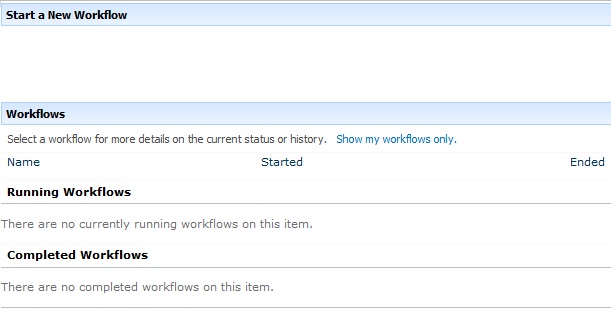
Cuando se creaba un documento nuevo y se queria dar inicio al workflow
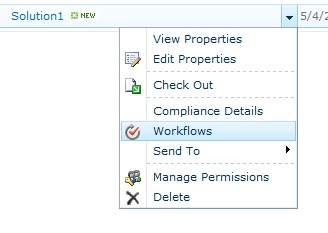
No habia ningún worflow disponible
Pero si ingresaba al manage workflows de la lista el mismo si estaba disponible

Este issue fue dificil de arreglar hasta que finalmente se encontro la solucion, al ingresar a ListSettings-> WorkflowSettings -> RemoteWorkflows, se modifico el radiobutton a allow, y ahi si estuvo disponible el flujo para poder ejecutarlo.

si sharePoint fuera perfecto no lo quería tanto,
Saludos
One or more field types are not installed properly. Go to the list settings page to delete these fields. May 4, 2012
Posted by juanpablo1manrique in SharePoint, SharePoint Development.Tags: Developer, sharepoin
1 comment so far
Hola amigos
Se me ha presentado este error al ejecutar el siguiente código. One or more field types are not installed properly. Go to the list settings page to delete these fields.
- int i = (from p in context.SporadicMessageInst
- where p.CreateDateCalc > date
- select p).ToList().Count;
No ve van a creer el problema que tenia pero lo que sucedia era que en el momento de llamar el contexto lo estaba haciendo con una URL incorrecta, los estaba haciendo con la URL del sitio principal y no la del subsitio donde estaba la lista
- Incorrecta
- var context = new COEMDataContext(“http://MiPC/Home“);
- Correcta
- var context = new COEMDataContext(“http://MiPC/Home/SporadicMessage“);
siempre puede suceder, entonces toca verificar que nos encontremos en el lugar correcto.
si la ruta es incorrecta y se intenta ajecutar el codigo
- var it = from p in context.SporadicMessageInst
- where p.CreateDateCalc > DateTime.Now
- select p;
Funciona bien pero cuando intento llamar el metodo
- it.Count();
- it.ToList();
Arroja el mismo error, y no hay forma de verificar que no sea nulo porque la linea
if (it != null)
Siempre arroja verdadero, entonces no hay forma de validar que estemos en el lugar incorrecto.
Saludos
Failover Server – Service Applications April 10, 2012
Posted by juanpablo1manrique in Best Practices, SharePoint.Tags: SharePoint
add a comment
Hola Amigos
Una curiosidad que tiene SharePoint y que no me habia percatado es que no todos los ServiceApplication que poseen una base de datos como repositorio de informacion tienen la opción de failover server.
Entre las que encontramos a
Security Token Service Application
- SharePoint Server ASP.NET Session State Service
- State Service
- Word Automation Services
- Web Analytics Service Application
- Visio Graphics Service
- Usage and Health data collection
- Search Service Application
Este es un detalle muy importante a tener en cuenta cuando se diseñen soluciones de alta disponibilidad con ambiente de contingencia.
Tomado de: http://technet.microsoft.com/es-un/library/ff628971.aspx
Saludos


 Letras y Números