Comandos Power Shell Utiles May 27, 2012
Posted by juanpablo1manrique in SharePoint.4 comments
- Consultar todas las templates instaladas
- $web.webtemplate | format-list
- to file
- $list.items | Out-File C:\filename.txt
- Reduce WSS_Logging
- $defs = Get-SPUsageDefinition
Foreach($def in $defs)
{
Set-SPUsageDefinition –Identity $def.Name –DaysRetained 1
}
- $defs = Get-SPUsageDefinition
- Query with Row Line number
- SELECT TOP 10 ROW_NUMBER() OVER (Order by [col1]) AS RowNumber,[col1]
FROM [dbo].[Table]
- SELECT TOP 10 ROW_NUMBER() OVER (Order by [col1]) AS RowNumber,[col1]
- excel arrow moves sheet not cell
- Windows
- On-Screen Keyboard
- When the on-screen keyboard appears, click the ScrLk or Slk button
- WSDL.exe
- WSDL.exe /language:CS /namespace:FourCalc /out:c:\Captures\FourCalc.cs http:\\localhost/FourFunctionCalc/Service1.asmx?sdl
- psconfig -cmd upgrade -inplace b2b
- read PublicKeyToken> en power shell
- ([system.reflection.assembly]::loadfile(“c:\MyVerificationDLL.dll”)).FullName
- PrerequisiteInstaller.exe /?
- Muestra los prerequisitos de esa versión
- Broacast skype 365 URL
- Borrar usuarios
- Get-SPUser -web http://www.misite.com -Limit ALL | Where-Object {$_.UserLogin -like “*fuckuser*”} | select UserLogin
- $user = Get-SPUser -web http://www.misite.com -identity “i:0#.f|sql_membership|fuckuser”
- Remove-SPUser -identity $user.ID -web http://www.misite.com
- Connect SharePoint Online
- Connect-SPOService -Url https://tenantname-admin.sharepoint.com -credential admin@contoso.com
- Allow MimeType
- $webApp = Get-SPWebApplication http://sharepoint.contoso.co
- # current allowed mimetypes
- $webApp.AllowedInlineDownloadedMimeTypes
- # add the text/html mime type
- $webApp.AllowedInlineDownloadedMimeTypes.Add(‘text/html’)
- $webApp.Update()
- Set Office 365 never expires
- Set-MsolUser -UserPrincipalName “userprincipalname” –PasswordNeverExpires $true
- MicrosoftEasyFix20150
- fix sync issues with OneDrive for Business automatically
- Get all assembly
- gacutil -l >yourassemblies.txt
- CamlQuery query = CamlQuery.CreateAllItemsQuery()
- CamlQuery query = CamlQuery.CreateAllItemsQuery(100)
- URL view all users
- …/_layouts/15/people.aspx?MembershipGroupId=0
- Otorgar permisos a la base de datos de configuración
-
- Add-SPShellAdmin aaa\bbbb
-
- Manage property bags
- $web = GEt-spweb “http://www.misite.com/subsite/”
- $web.Properties[“prop1”] = “88888”
- $web.Properties[“prop2”] = “0010”
- $web.Properties.Update();
- $web.Update();
- Shutdown . Apagar por comandos
- shutdown /r /t 0
- Copy Paste error
- rdpclip.exe
- Obtener el listado de listas de un sitio
- $web = GET-SPWeb “http://site/subsite/subsite/
- $web.lists | Format-Table title,id -AutoSize
- PowerShell
- add-PSSnapIn “Microsoft.SharePoint.Powershell”
- Crear sitio de Educacion
- New-SPEduClass –ClassId SPEU101 –ClassName “ElectronicaI” –site http://education.contoso.com
- Upgrade several sitecollections
- get-spsite -limit all | Upgrade-SPSite -VersionUpgrade -Unthrott
- Computer Management
- compmgmt.msc
- Sincronizar el reloj HORA
- w32tm /resync
- Usage Logs
- _layouts/usagedetails.aspx
- Activar Features en el web
- Get-SPSite http://misitio/ | Get-SPWeb -Limit ALL |%{ Get-SPFeature -Web $_ } | Select DisplayName,ID -Unique
- Enable-SPFeature -identity “9a447926-5937-44cb-857a-d3829301c73b” -URL http://misitio/
- Activar Features en el site
- Get-SPFeature -Limit ALL | Where-Object {$_.Scope -eq “SITE”}
- Enable-SPFeature -identity “9a447926-5937-44cb-857a-d3829301c73b” -URL http://misitio/
- Administrar Tipos de Contenido Huerfanos
- SELECT [SiteId],[Class],[Scope],sys.fn_varbintohexstr([ContentTypeId]) as CT,[Version],[NextChildByte],[Size],[Definition],[ResourceDir],[IsFromFeature]FROM [dbo].[ContentTypes]where (sys.fn_varbintohexstr(ContentTypeId) LIKE ‘0x010010bd6c5%’)
- Update [dbo].[ContentTypes]set [IsFromFeature] = 0where (sys.fn_varbintohexstr(ContentTypeId) LIKE ‘0x010010bd6c5%’)
- delete [dbo].[ContentTypes]where (sys.fn_varbintohexstr(ContentTypeId) LIKE ‘0x010010bd6c5%’)
- Elevarse permisos en SQL SERVER
- SQLCMD –E -S ‘Domain\Account’
- exec sp_addsrvrolemember @loginame=’Domain\Account’,@rolename=’sysadmin’
- Reiniciar servico SQL SERVER
- Comando para un copiar-pegar inteligente
- xcopy “E:\Source\MyProject\styles\*.*” “E:\Destine\MyProject\styles\*.*” /EXCLUDE:C:\FileList.txt /d/e/y/i
- Obtener el listado de archivos de un folder con subfolders
- dir /s /b>FileList.txt
- Borrar una lista corrupta
- $web = get-spweb -Identity http://sp2010
- $web.lists | select Title
- $list = $web.lists[“corrupted list name”]
- $list.AllowDeletion = $true
- $list.Update()
- $list.Delete()
- — reset the logging thresholds loggin SharePoint
- stsadm -o setlogginglevel -category IRM -default
- Get-SPLogLevel | Clear-SPLogLevel
- to windows config hour sinchronize whit DC
- w32tm /query /status
- w32tm /resync
- w32tm /config /syncfromflags:manual /manualpeerlist: [lista] , donde [lista] son los nombres DNS o IP de los servidores con los que se debe sincronizar, separados por comas
- Get AD usuarios con un dato especifico
- Get-ADUser -filter {employeeID -like “*” }| Get-ADObject -properties employeeid | Format-List name,employeeid
- Actualizar un parametro con un CSV usuarios de AD
- Import-CSV C:\test.csv | foreach { Set-ADUser $_.username -EmployeeID $_.id }
- SQL Commands
- NOT LIKE ‘%[^0-9]%’ isnumeric dont work for e or d
- http://www.sqlservercentral.com/articles/IsNumeric/71512/
- IIS Commands enable Rastreo de procesos del Pool
- cd C:\Windows\System32\inetsrv
- appcmd list wp
- appcmd list wps /apppool.name:DefaultAppPool
- IIS 7.0 -> Root -> Worker Process “Procesos de Trabajo” -> Select -> ver solicitudes actuales
- IIS 6.0 cscript iisapp.vbs
Como Habilitar/Deshabilitar Windows Error Reporting y el manejo de archivos HDMP\MDMP May 27, 2012
Posted by juanpablo1manrique in SharePoint.Tags: install, SharePoint
1 comment so far
No te ha pasado que de repente tu servidor de sharepoint 2010 deja de funcionar correctamente, y al revisar se ha quedado sin espacio, en el disco C:. Esto sucede porque Windows Error Reporting esta habilitado. Esta funcionalidad hace que cada vez que se genere un error se genere un archivo HDMP con toda la información del error que se genero cuando una aplicación ha fallado, tambien se genera un archivo MDMP con toda la información comprimida de la memoria DUMP de cuando sucedio el error.
Toda esta información es utilizada cuando se decide enviar los errores a microsoft, pero el espacio utilizado no es liberado.
Para chequear esto no esta sucediendo en nuestro servidor debemos mirar la carpeta
Windows 2003, win XP
C:\WINDOWS\pchealth\ERRORREP\UserDumps
Windows 2008, win 7
C:\DOCUME~1\USER~1\LOCALS~1\Temp\WER8bd7.dir00\w3wp.exe.mdmp
C:\ProgramData\Microsoft\Windows\WER\ReportArchive
C:\ProgramData\Microsoft\Windows\WER\ReportQueue
C:\Users\UserProfileName\AppData\Local\Microsoft\Windows\WER\ReportArchive
C:\Users\UserProfileName\AppData\Local\Microsoft\Windows\WER\ReportQueue
Donde encontraremos archivos del tipo
w3wp.exe{time}.mdmp
w3wp.exe{time}.hdmp
Podemos desabilitar esta opción de la siguiente manera
Windows 2003, Win XP
1. Click derecho “My Computer” y click en propiedades
2. Click en advanced y seleccionar “Error reporting”
3. Seleccionar Deshabilitar
4. Se pueden habilitar solo las aplicaciones que queramos que reporten
Windows 2008, Win 7 regedit
Entrar al regedit
HKEY_LOCAL_MACHINE\SOFTWARE\Microsoft\Windows\Windows Error Reporting\
y agregar la instruccion
Disabled (dword) 1 (hex)
Windows 2008, Win 7 Visualmente
1. Click derecho “My Computer” y click en propiedades
2. Click en advanced y seleccionar “¨Performance” -> settings
3. Click en “Data Execution Prevention”
4. Turn on DEP for essencial windows programs and services only.
Para mayor información pueden consultar
http://blogs.technet.com/b/yongrhee/archive/2010/12/29/drwtsn32-on-windows-vista-windows-server-2008-windows-7-windows-server-2008-r2.aspx
http://www.mywebhostingblog.net/aspnet-web-hosting/windows-error-reporting/
http://www.windowsreference.com/general/how-to-enabledisable-windows-error-reporting-and-handle-hdmpmdmp-files/
New-SPConfigurationDatabase : Cannot bind parameter ‘FarmCredentials’. Cannot convert the “xxx” value of type “System.String” to type “System.Management.Automation.PSCredential”. May 8, 2012
Posted by juanpablo1manrique in SharePoint.1 comment so far
Hola
Este sucede cuando se corre el comando
New-SPConfigurationDatabase -DatabaseName “SharePoint_Config” -DatabaseServer “.” -Passphrase (ConvertTo-SecureString “MyPassword” -AsPlainText -force) -FarmCredentials “SHPJUANPABLOPC\shpservice”
Una forma de arreglarlo es correrlo sin el parametro de -FarmCredentials, al hacerlo se nos despliega una ventana solicitando las credenciales
New-SPConfigurationDatabase -DatabaseName “SharePoint_Config” -DatabaseServer “.” -Passphrase (ConvertTo-SecureString “MyPassword” -AsPlainText -force)
Missing WF May 4, 2012
Posted by juanpablo1manrique in SharePoint, SharePoint Development.Tags: SharePoint, Workflow
1 comment so far
Missing WF
Se me ha perdido un flujo de trabajo, suena curioso pero es verdad, en estos días un cliente me ha llamado y me ha dicho se me ha perdido un WF sono curioso pero era verdad.
Cuando se creaba un documento nuevo y se queria dar inicio al workflow
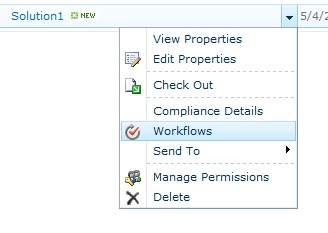
No habia ningún worflow disponible
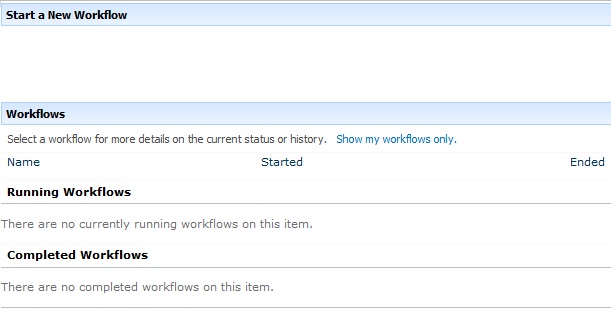
Pero si ingresaba al manage workflows de la lista el mismo si estaba disponible

Este issue fue dificil de arreglar hasta que finalmente se encontro la solucion, al ingresar a ListSettings-> WorkflowSettings -> RemoteWorkflows, se modifico el radiobutton a allow, y ahi si estuvo disponible el flujo para poder ejecutarlo.

si sharePoint fuera perfecto no lo quería tanto,
Saludos
One or more field types are not installed properly. Go to the list settings page to delete these fields. May 4, 2012
Posted by juanpablo1manrique in SharePoint, SharePoint Development.Tags: Developer, sharepoin
1 comment so far
Hola amigos
Se me ha presentado este error al ejecutar el siguiente código. One or more field types are not installed properly. Go to the list settings page to delete these fields.
- int i = (from p in context.SporadicMessageInst
- where p.CreateDateCalc > date
- select p).ToList().Count;
No ve van a creer el problema que tenia pero lo que sucedia era que en el momento de llamar el contexto lo estaba haciendo con una URL incorrecta, los estaba haciendo con la URL del sitio principal y no la del subsitio donde estaba la lista
- Incorrecta
- var context = new COEMDataContext(“http://MiPC/Home“);
- Correcta
- var context = new COEMDataContext(“http://MiPC/Home/SporadicMessage“);
siempre puede suceder, entonces toca verificar que nos encontremos en el lugar correcto.
si la ruta es incorrecta y se intenta ajecutar el codigo
- var it = from p in context.SporadicMessageInst
- where p.CreateDateCalc > DateTime.Now
- select p;
Funciona bien pero cuando intento llamar el metodo
- it.Count();
- it.ToList();
Arroja el mismo error, y no hay forma de verificar que no sea nulo porque la linea
if (it != null)
Siempre arroja verdadero, entonces no hay forma de validar que estemos en el lugar incorrecto.
Saludos
Failover Server – Service Applications April 10, 2012
Posted by juanpablo1manrique in Best Practices, SharePoint.Tags: SharePoint
add a comment
Hola Amigos
Una curiosidad que tiene SharePoint y que no me habia percatado es que no todos los ServiceApplication que poseen una base de datos como repositorio de informacion tienen la opción de failover server.
Entre las que encontramos a
Security Token Service Application
- SharePoint Server ASP.NET Session State Service
- State Service
- Word Automation Services
- Web Analytics Service Application
- Visio Graphics Service
- Usage and Health data collection
- Search Service Application
Este es un detalle muy importante a tener en cuenta cuando se diseñen soluciones de alta disponibilidad con ambiente de contingencia.
Tomado de: http://technet.microsoft.com/es-un/library/ff628971.aspx
Saludos
Login failed for user ‘XXX’. Reason: Attempting to use an NT account name with SQL Server Authentication. [CLIENT: ] March 29, 2012
Posted by juanpablo1manrique in SharePoint.add a comment
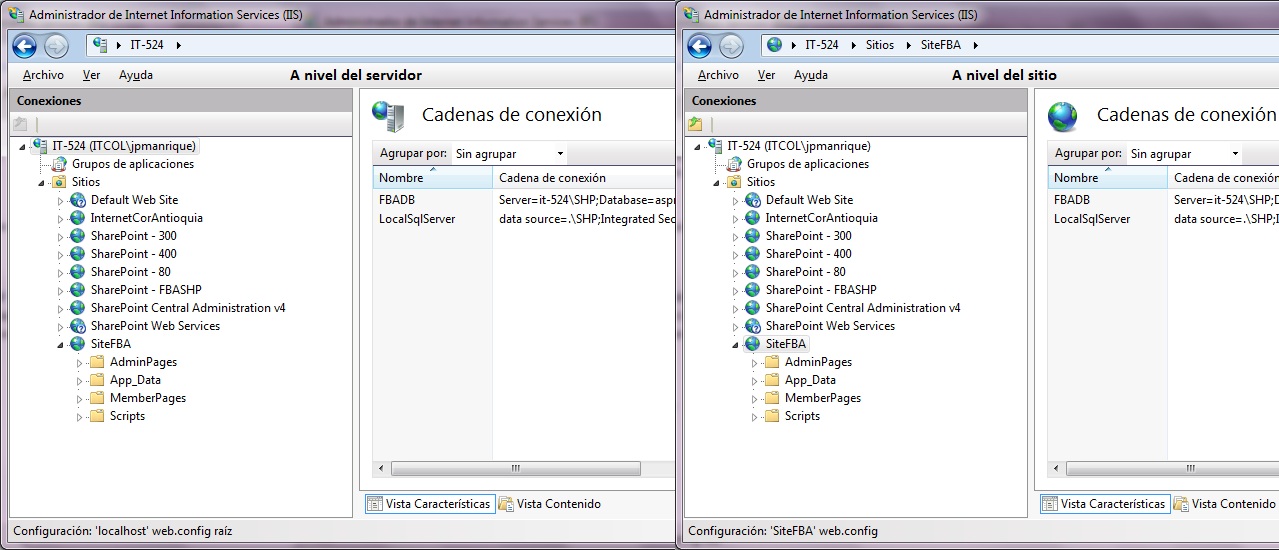
Se me presento este error en el momento de habilitar un proveedor SQLMemberShipProvider en el IIS, curiosamente lo que sucedio es que cuando cree el string conection a nivel de todo el IIS despues de tantas vueltas el stringconecction a nivel del sitio guardaba otra configuración,
Por lo tanto es necesario verificar tanto los strings conections del sitio y del IIS server completo

Codificación de usuarios : SAML : 0#.w : 0#.f March 26, 2012
Posted by juanpablo1manrique in Developer, SharePoint, SharePoint Development, Visual studio 2008.Tags: Developer, SharePoint
1 comment so far
Codificación de usuarios: SAML : 0#.w : 0#.f
Cuando se llama un usuario desde código se muestran unos códigos raros que se agregan al nombre de usuario, investigando sobre el tema los numeros extraños son codificación SAML el cual es necesario para soportar varios tipos de autenticación y el manejo de claims.
Para el caso de usuarios que vienen de sqlMemberShip tenemos códigos como:
0#.f|sqlmembership|user1
Para usuarios que vienen de directorio activo se codifican de la siguiente manera 0#.w|steve\\wilmaf
Una de los posibles maneras de trabajar con estos usuarios y limpiar estos códigos es utilizar lo siguiente,
string userLoginEncoded = SPUtility.FormatAccountName(“i”, entity.Value); string userLogin = SPClaimProviderManager.Local.DecodeClaim(userLoginEncoded).Value;
Espero que les sea de ayuda
Saludos
Form control does not have ControlMode set February 8, 2012
Posted by juanpablo1manrique in SharePoint Development.Tags: Developer, SharePoint
1 comment so far
Hola amigos
Tuve este error cuando estaba trabajando con Visual WebParts en el momento de agregar un Update Panel
Form control does not have ControlMode set
————————————————————–
<asp:UpdatePanel ID=”UpdatePanel1″ runat=”server”>
<ContentTemplate>
<table >
<tr ………….
</tr>
</table>
</ContentTemplate>
</asp:UpdatePanel>
La forma de solucionarlo fue ingresar al archivo de definicion del WebPart, este archivo lo podemos ubicar porque hereda de WebPart
public class MyControl : WebPart
La forma de solucionarlo es asignar el SPcontrolMode, este parametro se debe modificar antes de que se ejecute el evento de Page_Load por lo tanto lo debemos agregar en el método CreateChildControls
protected override void CreateChildControls()
{
SPContext.GetContext(this.Context).FormContext.FormMode = SPControlMode.Display;
Saludos
SharePoint no tiene en cuenta los milisegundos January 25, 2012
Posted by juanpablo1manrique in SharePoint, SharePoint Development.Tags: Developer, SharePoint
1 comment so far
Si se realiza un query como
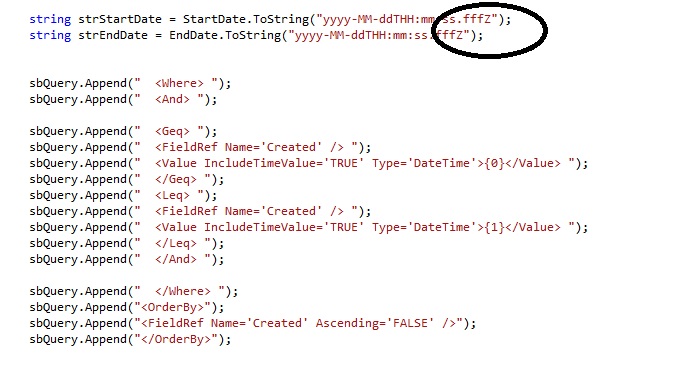
en donde queremos obtener los items que se encuentren entre un rango de fechas
DateTime endt = new DateTime(2012, 01, 24, 10, 41, 26, 451); //2012/01/24 10:41:26.451
DateTime endt = new DateTime(2012, 01, 24, 10, 41, 27, 478); //2012/01/24 10:41:27.478
Aunque el CAML Query no falla, definitivamente no tiene en cuenta los milisegundos, sino que los resultados que retorna solo tienen en cuenta los segundos y el resultado es acorde solo a los segundos,
Me puse en la tarea de realizar una búsqueda e imprimir el dato que contenia la columna tipo fecha de la siguiente manera,
DateTime itemCreatedDate = (DateTime)objSPItem[“Created”];
sbMessageResponse.Append(“<br />” + itemCreatedDate.ToString(“yyyy-MM-ddTHH:mm:ss.fffZ”));
El valor mostrado en pantalla no posee valores de milisegundos
——————————Created:2012-01-24T10:41:27.000Z


 Letras y Números