Change EPT Project Server August 20, 2013
Posted by juanpablo1manrique in SharePoint.Tags: ProjectServer
add a comment
Hola,
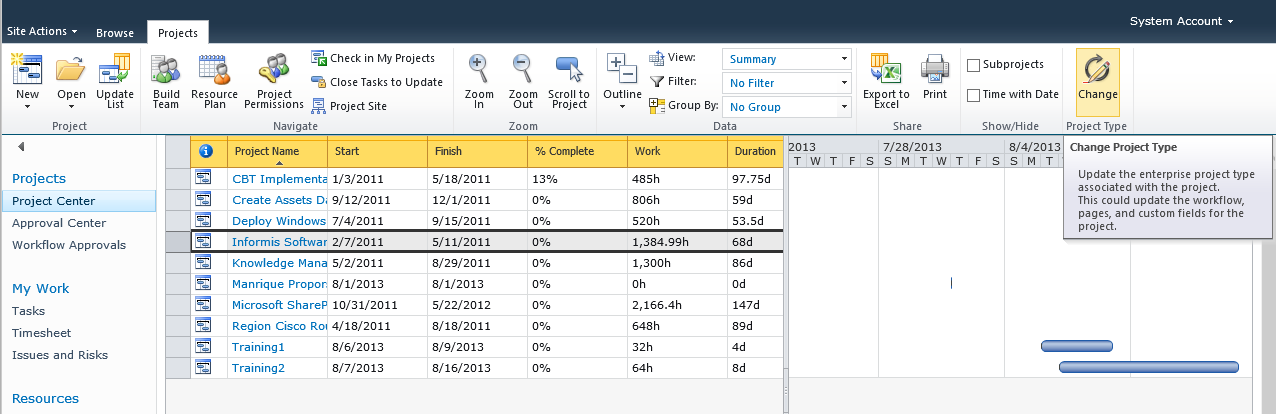
Para cambiar el Enterprise Project Type existen algunas opciones para realizar esta acción,
con workflow

sin workflow
Saludos
System.Windows.Forms.Panel Controls.Add only see first July 27, 2013
Posted by juanpablo1manrique in SharePoint.Tags: .NET
add a comment
Buen día amigos,
Aquí estoy realizando una aplicación Windows forms, pero en forms ciertas cosas funcionan diferente, me anime a escribir este post para todos aquellos que estamos acostumbrados a desarrollar WEB y nos encontramos con la necesidad de Hacer WindowsForms por casualidad.
Al ejecutar este código solo veía el primer control,
- Label lbl = new Label();
- lbl.Text = “sdfsdasdcsddf”;
- Panel12.Controls.Add(lbl);
- TextBox lbl3 = new TextBox();
- lbl3.Text = “1234 ABC”;
- Panel12.Controls.Add(lbl3);
- Label lbl2 = new Label();
- lbl2.Text = “123223”;
- Panel12.Controls.Add(lbl2);
Las solución para que en pantalla no se viera solo el primero fue agregar el location
- Label lbl = new Label();
- lbl.Text = “sdfsdasdcsddf”;
- lbl.Location = new System.Drawing.Point(0, 0);
- Panel12.Controls.Add(lbl);
- TextBox lbl3 = new TextBox();
- lbl3.Text = “1234 ABC”;
- lbl3.Location = new System.Drawing.Point(0, lbl.Size.Height);
- Panel12.Controls.Add(lbl3);
- Label lbl2 = new Label();
- lbl2.Text = “123223”;
- lbl2.Location = new System.Drawing.Point(0, lbl.Size.Height + lbl3.Size.Height);
- Panel12.Controls.Add(lbl2);
Happy WinForm Coding
Open HTML, FLASH, PDF files in SharePoint Library try Download July 15, 2013
Posted by juanpablo1manrique in SharePoint, SharePoint2013.Tags: SharePoint
2 comments
Hola
En estos días tuve el impedimento de poder desplegar archivos HTML, PDF, FLASH desde una librería de SharePoint, al dar click sobre un archivo HTML que estaba en una librería, me lo intentaba descargar en vez de abrirlo de una vez,
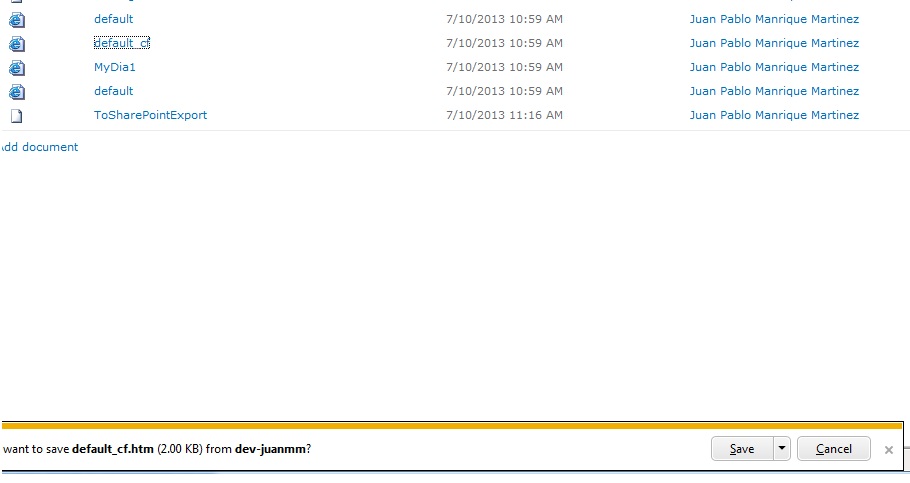
Una de las soluciones fue ir al central administrator y en los settings del webApplication decirle “permissive”, pero la idea no era darle “permissive” ya que esto abría un poco la seguridad del web application, así que seguí buscando y encontré la función AllowedInlineDownloadedMimeTypes (Realmente es un vector), el cual permite agregar los tipos de application que quiero que se desplieguen sobre SharePoint, el script completo quedo de la siguiente manera.
$webApp=Get-SPWebApplication http://webapplicationurl:90
$webApp.BrowserFileHandling = “strict”
$webApp.AllowedInlineDownloadedMimeTypes.Add(“application/octet-stream”)
$webApp.AllowedInlineDownloadedMimeTypes.Add(“text/html”)
$webApp.AllowedInlineDownloadedMimeTypes.Add(“application/pdf”)
$webApp.AllowedInlineDownloadedMimeTypes.Add(“application/x-shockwave-flash”)
$webApp.Update()
Para poder ver que tipo de application que quiero desplegar, me recomendaron RESTClient de Firefox el cual me dice que tipo de application es el que necesito
https://addons.mozilla.org/en-us/firefox/addon/restclient/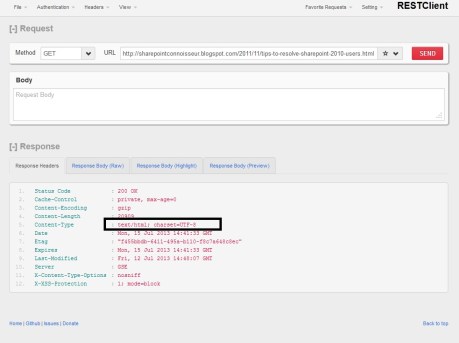
PD. los archivo de tipo “application/octet-stream” igualmente no se abren en modo permissive sino que toca, colocarlo strict y agregar el tipo de application correspondiente.
Happy SharePoint,
Move sites in other database content July 6, 2013
Posted by juanpablo1manrique in SharePoint.add a comment
En este caso vamos a mirar como mover sites entre bases de datos de contenido en el caso de Sharepoint 2010,
Lo primero es crear un archivo XML con la ubicación de los sitios que deseamos mover,
stsadm -o enumsites -url http://localhost > c:\sites.xml
Este comando enumera todos los sitios de este WebApplication, así que es necesario editarlo en notepad y eliminar los sitios que no queremos mover, y luego ejecutamos el siguiente comando,
stsadm -o mergecontentdbs -url http://localhost -sourcedatabasename WSS_Content -destinationdatabasename WSS_content_2 -operation 3 -filename c:\sites.xml
y taran,
Hack or restore sa account sql server March 18, 2013
Posted by juanpablo1manrique in SharePoint.add a comment
Exactamente no la vamos a hackiar, vamos a elevernos permisos a ‘sysadmin’ y ahi recuperar el control de la instancia de SQL SERVER y entrar en modo Dios.
- Iniciar consola con permisos de administración
- cd\ para pararse en C:
- SQLCMD –E -S ‘Domain\Account’
- CREATE LOGIN ‘Domain\Account’ FROM WINDOWS *
- exec sp_addsrvrolemember @loginame=’Domain\Account’,@rolename=’sysadmin’
- servics.msc y reiniciar el servicio, tambien se puede hacer desde la consola de administración de SQL pero es lo mismo
* Este es un paso adicional que no siempre es necesario, toca ejecutarlo en caso que no se logre entrar a la instancia, por lo general se logran entrar dado que el BUILTIN\Users siempre esta presente en todas las instancias de SQL muy pocas veces se toman el trabajo de quitarlo para asegurar la instancia. En caso de que se logre entrar a la instancia este usuario se puede crear por el management studio pero va a quedar con permisos de public y luego se corre este procedimiento por comandos para elevarle los permisos.
Esto no es exactamente Hackear la cuenta, solo es entrar con una cuenta de administrador y elevarse privilegios, para casos más extremos se puede utilizar
http://www.windowsecurity.com/articles-tutorials/misc_network_security/Hacking_an_SQL_Server.html
Saludos
Error: var logoImg = documentGetElementsByName – MoveSiteTitle February 24, 2013
Posted by juanpablo1manrique in SharePoint, SharePoint Development.Tags: MasterPage, SharePoint
3 comments
Hola Amigos
Ahora que ingresamos al mundo cross-browser, con sharepoint 2013, encontrmos que sharepoint 2010 todavia tiene algunos incovenientes, uno de ellos se me present en estos días al estar trabajando con el SharePoint recien instalado y con el Master.Page v4 que trae sharepoint por defecto, en Chrome en el momento de hacer debug se evidenciaba error en estas 2 líneas.

solucion medio temporal:
En SharePoint designer se busca el PlaceHolder:PlaceHolderPageTitleInTitleArea al abrir el master page se le dice a que visible = false
<asp:ContentPlaceHolder id=”PlaceHolderPageTitleInTitleArea” runat=”server” Visible=”false” />
Esto ya no renderiza este molesto código en sharepoint
Se intento bajar el ultimo Cumulative Update de Diciembre 2012 http://support.microsoft.com/hotfix/KBHotfix.aspx?kbnum=2596957
Pero esto no soluciono el problema
Asi que este place holder quedo con la propiedad visible=”false”, esta solución no me convence del todo así que seguire investigando sobre el tema, cualquier sugerencia con gusto sera recibida.
SHPludos
Reordenar las propiedades de un WebPart January 22, 2013
Posted by juanpablo1manrique in SharePoint.add a comment
Hola Amigos
Cuando se agregan propiedades personalizadas a un WebPart las mismas quedan de ultimas.

- Recordemos que al crear un VisualWEbPart siempre se crean 2 archivos WebPartMyClass y UserControlWebPartMyClass.
Estuve investigando un resto como ponerlas en el primer lugar, pero no encontre nada, esta vez san Google no me ayudo, así que toco pedirle ayuda a otro santo, a VS 2010. Me dio por sobreescribir solo a nivel de prueba el metodo, en WebPartMyClass:
public override Microsoft.SharePoint.WebPartPages.ToolPart[] GetToolParts()
Y al mirar por debug las variables en cuestion me encontre con, muy buenas noticias.
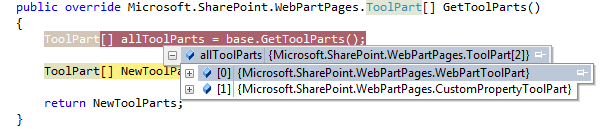
El metodo final quedo de la siguiente manera, y ya se ven en el orden que queria


Siempre es bueno probar override de las clases que uno tiene disponibles, haber que encuentra,
saludos
Modificar las propiedades de un WebPart sin usar el control de EditWebPart por defecto de SharePoint January 18, 2013
Posted by juanpablo1manrique in SharePoint, SharePoint Development.Tags: SharePoint
add a comment
Hola amigos
En esta oportunidad he tenido el atrevimiento de modificar las propiedades de un webPart desde un boton sin necesidad de utilizar el control de propiedades que trae por defecto SharePoint,
Recordemos que un WebPart esta dividido en 2 clases importantes una para la definición de WebPart que hereda de Microsoft.SharePoint.UI.WebParts.WebPart de ahora en adelante WebPartMyClass y otra que es un User Control ascx; en el caso de los WebPart visuales de ahora en adelante alias UserControlWebPartMyClass,
Para lograr salvar las propiedades de esta manera es necesario construir un metodo publico en WebPartMyClass de la siguiente manera
public void SaveCustomProperties(string val1, string val2)
{
this.Property1 = val1;
this.Property2 = val2;
this.SaveProperties = true;
this.SaveControlState();
}
El código dice más que mil palabras, 🙂
Y desde el evento de boton del ascx (UserControlWebPartMyClass) llamar este metodo que acabamos de construir de la siguiente manera
protected void Button1_Click(object sender, EventArgs e)
{
((WebPartMyClass)this.Parent).SaveCustomProperties(“val1”, “val2”);
}
Aqui el código de las 2 clases
— Clase WebPartMyClass
using System;
using System.ComponentModel;
using System.Web;
using System.Web.UI;
using System.Web.UI.WebControls;
using System.Web.UI.WebControls.WebParts;
using Microsoft.SharePoint;
using Microsoft.SharePoint.WebControls;
namespace xxxx
{
[ToolboxItemAttribute(false)]
public class Processes : WebPart
{
// Visual Studio might automatically update this path when you change the Visual Web Part project item.
private const string _ascxPath = @”~/_CONTROLTEMPLATES/yyyyy/UserControlWebPartMyClass.ascx”;
protected override void CreateChildControls()
{
Control control = Page.LoadControl(_ascxPath);
((UserControlWebPartMyClass)control).Property1 = this.Property1;
((UserControlWebPartMyClass)control).Property2 = this.Property2;
Controls.Add(control);
}
public void SaveCustomProperties(string val1, string val2)
{
this.Property1 = val1;
this.Property2 = val2;
this.SaveProperties = true;
this.SaveControlState();
}
[WebBrowsable(true), WebDisplayName(“Property1”), WebDescription(“Property1”),
Personalizable(PersonalizationScope.Shared), Category(“Custom Property”),
System.ComponentModel.DefaultValue(“”)]
public string Property1{get;set;}
[WebBrowsable(true), WebDisplayName(“Property1”), WebDescription(“Property1”),
Personalizable(PersonalizationScope.Shared), Category(“Custom Property”),
System.ComponentModel.DefaultValue(“”)]
public string Property2{get;set;}
}
}
— UserControlWebPartMyClass —
using System;
using System.Web.UI;
using System.Web.UI.WebControls;
using System.Web.UI.WebControls.WebParts;
using Microsoft.SharePoint.WebPartPages;
namespace xxxx
{
public partial class ProcessesUserControl : WebPartControl
{
protected void Page_Load(object sender, EventArgs e)
{
}
protected void Button1_Click(object sender, EventArgs e)
{
((WebPartMyClass)this.Parent).SaveCustomProperties(“val1”, “val2”);
}
}
}
Este post fue inspirado por esta duda
SQL SERVER 2012 Enterprise vs Business Intelligence vs Standard vs Web vs Express with Advanced Services vs Express with Tools vs Express December 10, 2012
Posted by juanpablo1manrique in SharePoint.1 comment so far
Y en este mundo de las comparaciones …
| SQL SERVER 2012 | Enterprise | Business Intelligence | Standard | Web | Express with Advanced Services | Express with Tools | Express |
| Cross-Box Scale Limits | |||||||
|
Feature Name
|
Enterprise | Business Intelligence | Standard | Web | Express with Advanced Services | Express with Tools | Express |
| Maximum Compute Capacity Used by a Single Instance (SQL Server Database Engine)1 | Operating System maximum | Limited to lesser of 4 Sockets or 16 cores | Limited to lesser of 4 Sockets or 16 cores | Limited to lesser of 4 Sockets or 16 cores | Limited to lesser of 1 Socket or 4 cores | Limited to lesser of 1 Socket or 4 cores | Limited to lesser of 1 Socket or 4 cores |
| Maximum Compute Capacity Used by a Single Instance (Analysis Services, Reporting Services) 1 |
Operating system maximum | Operating system maximum | Limited to lesser of 4 Sockets or 16 cores | Limited to lesser of 4 Sockets or 16 cores | Limited to lesser of 1 Socket or 4 cores | Limited to lesser of 1 Socket or 4 cores | Limited to lesser of 1 Socket or 4 cores |
| Maximum memory utilized (SQL Server Database Engine) | Operating system maximum | 64 GB | 64 GB | 64 GB | 1 GB | 1 GB | 1 GB |
| Maximum memory utilized (Analysis Services) | Operating system maximum | Operating system maximum | 64 GB | N/A | N/A | N/A | N/A |
| Maximum memory utilized (Reporting Services) | Operating system maximum | Operating system maximum | 64 GB | 64 GB | 4 GB | N/A | N/A |
| Maximum relational Database size | 524 PB | 524 PB | 524 PB | 524 PB | 10 GB | 10 GB | 10 GB |
| High Availability (AlwaysOn) | |||||||
|
Feature Name
|
Enterprise | Business Intelligence | Standard | Web | Express with Advanced Services | Express with Tools | Express |
| Server Core support1 | Yes | Yes | Yes | Yes | Yes | Yes | Yes |
| Log Shipping | Yes | Yes | Yes | Yes | |||
| Database mirroring | Yes | Yes (Safety Full Only) | Yes (Safety Full Only) | Witness only | Witness only | Witness only | Witness only |
| Failover Clustering | Yes (Node support: Operating system maximum | Yes (Node support: 2) | Yes (Node support: 2) | ||||
| Backup compression | Yes | Yes | Yes | ||||
| Database snapshot | Yes | ||||||
| AlwaysOn Availability Groups | Yes | ||||||
| SQL Server Multi-Subnet Clustering | Yes | ||||||
| Mirrored backups | Yes | ||||||
| Hot Add Memory and CPU2 | Yes | ||||||
| Database Recovery Advisor | Yes | Yes | Yes | Yes | Yes | Yes | Yes |
| Scalability and Performance | |||||||
|
Feature Name
|
Enterprise | Business Intelligence | Standard | Web | Express with Advanced Services | Express with Tools | Express |
| Multi-instance support | 50 | 50 | 50 | 50 | 50 | 50 | 50 |
| Table and index partitioning | Yes | ||||||
| Data compression | Yes | ||||||
| Resource Governor | Yes | ||||||
| Partition Table Parallelism | Yes | ||||||
| Multiple Filestream containers | Yes | ||||||
| Security | |||||||
|
Feature Name
|
Enterprise | Business Intelligence | Standard | Web | Express with Advanced Services | Express with Tools | Express |
| Basic Auditing | Yes | Yes | Yes | Yes | Yes | Yes | Yes |
| Fine Grained Auditing | Yes | ||||||
| Transparent database encryption | Yes | ||||||
| Extensible Key Management | Yes | ||||||
| User-Defined Roles | Yes | Yes | Yes | Yes | Yes | Yes | Yes |
| Contained Databases | Yes | Yes | Yes | Yes | Yes | Yes | Yes |
| Replication | |||||||
|
Feature Name
|
Enterprise | Business Intelligence | Standard | Web | Express with Advanced Services | Express with Tools | Express |
| SQL Server change tracking | Yes | Yes | Yes | Yes | Yes | Yes | Yes |
| Merge replication | Yes | Yes | Yes | Yes (Subscriber only) | Yes (Subscriber only) | Yes (Subscriber only) | Yes (Subscriber only) |
| Transactional replication | Yes | Yes | Yes | Yes (Subscriber only) | Yes (Subscriber only) | Yes (Subscriber only) | Yes (Subscriber only) |
| Snapshot replication | Yes | Yes | Yes | Yes (Subscriber only | Yes (Subscriber only) | Yes (Subscriber only) | Yes (Subscriber only) |
| Heterogeneous subscribers | Yes | Yes | Yes | ||||
| Oracle publishing | Yes | ||||||
| Peer to Peer transactional replication | Yes | ||||||
| Management Tools | |||||||
|
Feature Name
|
Enterprise | Business Intelligence | Standard | Web | Express with Advanced Services | Express with Tools | Express |
| SQL Management Objects (SMO) | Yes | Yes | Yes | Yes | Yes | Yes | Yes |
| SQL Configuration Manager | Yes | Yes | Yes | Yes | Yes | Yes | Yes |
| SQL CMD (Command Prompt tool) | Yes | Yes | Yes | Yes | Yes | Yes | Yes |
| SQL Server Management Studio | Yes | Yes | Yes | Yes | Yes | Yes | |
| Distributed Replay – Admin Tool | Yes | Yes | Yes | Yes | Yes | Yes | |
| Distributed Replay – Client | Yes | Yes | Yes | Yes | |||
| Distributed Replay – Controller | Yes (Enterprise supports up to 16 clients, Developer supports only 1 client) | Yes (1 client support only) | Yes (1 client support only) | Yes (1 client support only) | |||
| SQL Profiler | Yes | Yes | Yes | No2 | No2 | No2 | No2 |
| SQL Server Agent | Yes | Yes | Yes | Yes | |||
| Microsoft System Center Operations Manager Management Pack | Yes | Yes | Yes | Yes | |||
| Database Tuning Advisor (DTA) | Yes | Yes | Yes3 | Yes3 | |||
| RDBMS Manageability | |||||||
|
Feature Name
|
Enterprise | Business Intelligence | Standard | Web | Express with Advanced Services | Express with Tools | Express |
| User Instances | Yes | Yes | Yes | ||||
| LocalDB | Yes | Yes | |||||
| Dedicated admin connection | Yes | Yes | Yes | Yes | Yes (under trace flag) | Yes (under trace flag) | Yes (under trace flag) |
| PowerShell scripting support | Yes | Yes | Yes | Yes | Yes | Yes | Yes |
| SysPrep support1 | Yes | Yes | Yes | Yes | Yes | Yes | Yes |
| Support for Data-tier application component operations – extract, deploy, upgrade, delete |
Yes | Yes | Yes | Yes | Yes | Yes | Yes |
| Policy automation (check on schedule and change) | Yes | Yes | Yes | Yes | |||
| Performance data collector | Yes | Yes | Yes | Yes | |||
| Able to enroll as a managed instance in a multi-instance management | Yes | Yes | Yes | Yes | |||
| Standard performance reports | Yes | Yes | Yes | Yes | |||
| Plan guides and plan freezing for plan guides | Yes | Yes | Yes | Yes | |||
| Direct query of indexed views (using NOEXPAND hint) | Yes | Yes | Yes | Yes | |||
| Automatic indexed view maintenance | Yes | Yes | Yes | Yes | |||
| Distributed partitioned views | Yes | Partial. Distributed Partitioned Views are not updatable | Partial. Distributed Partitioned Views are not updatable | Partial. Distributed Partitioned Views are not updatable | Partial. Distributed Partitioned Views are not updatable | Partial. Distributed Partitioned Views are not updatable | Partial. Distributed Partitioned Views are not updatable |
| Parallel indexed operations | Yes | ||||||
| Automatic use of indexed view by query optimizer | Yes | ||||||
| Parallel consistency check | Yes | ||||||
| SQL Server Utility control point | Yes | ||||||
| Contained Databases | Yes | Yes | Yes | Yes | Yes | Yes | Yes |
| Development Tools | |||||||
|
Feature Name
|
Enterprise | Business Intelligence | Standard | Web | Express with Advanced Services | Express with Tools | Express |
| Microsoft Visual Studio Integration | Yes | Yes | Yes | Yes | Yes | Yes | Yes |
| SQL Server Developer Studio | Yes | Yes | Yes | Yes | Yes | Yes | Yes |
| Intellisense (Transact-SQL and MDX) 1 | Yes | Yes | Yes | Yes | Yes | Yes | Yes |
| SQL Server Data Tools (SSDT) | Yes | Yes | Yes | Yes | Yes | ||
| SQL query edit and design tools1 | Yes | Yes | Yes | ||||
| Version control support1 | Yes | Yes | Yes | ||||
| MDX edit, debug, and design tools1 | Yes | Yes | Yes | ||||
| Programmability | |||||||
|
Feature Name
|
Enterprise | Business Intelligence | Standard | Web | Express with Advanced Services | Express with Tools | Express |
| Common Language Runtime (CLR) Integration | Yes | Yes | Yes | Yes | Yes | Yes | Yes |
| Native XML support | Yes | Yes | Yes | Yes | Yes | Yes | Yes |
| XML indexing | Yes | Yes | Yes | Yes | Yes | Yes | Yes |
| MERGE & UPSERT Capabilities | Yes | Yes | Yes | Yes | Yes | Yes | Yes |
| FILESTREAM support | Yes | Yes | Yes | Yes | Yes | Yes | Yes |
| FileTable | Yes | Yes | Yes | Yes | Yes | Yes | Yes |
| Date and Time datatypes | Yes | Yes | Yes | Yes | Yes | Yes | Yes |
| Internationalization support | Yes | Yes | Yes | Yes | Yes | Yes | Yes |
| Full-text and semantic search | Yes | Yes | Yes | Yes | Yes | ||
| Specification of language in query | Yes | Yes | Yes | Yes | Yes | ||
| Service Broker (messaging) | Yes | Yes | Yes | No (Client only) | No (Client only) | No (Client only) | No (Client only) |
| Web services (HTTP/SOAP endpoints) | Yes | Yes | Yes | Yes | |||
| TSQL endpoints | Yes | Yes | Yes | Yes | |||
| Integration Services | |||||||
|
Feature
|
Enterprise | Business Intelligence | Standard | Web | Express with Advanced Services | Express with Tools | Express |
| SQL Server Import and Export Wizard | Yes | Yes | Yes | Yes | Yes | Yes | Yes |
| Built-in data source connectors | Yes | Yes | Yes | Yes | Yes | Yes | Yes |
| SSIS designer and runtime | Yes | Yes | Yes | ||||
| Basic Transforms | Yes | Yes | Yes | ||||
| Basic data profiling tools | Yes | Yes | Yes | ||||
| Change Data Capture Service for Oracle by Attunity | Yes | ||||||
| Change Data Capture Designer for Oracle by Attunity | Yes | ||||||
| Integration Services – Advanced Adapters | |||||||
|
Feature Name
|
Enterprise | Business Intelligence | Standard | Web | Express with Advanced Services | Express with Tools | Express |
| High performance Oracle destination | Yes | ||||||
| High performance Teradata destination | Yes | ||||||
| SAP BW source and destination | Yes | ||||||
| Data mining model training destination adapter | Yes | ||||||
| Dimension processing destination adapter | Yes | ||||||
| Partition processing destination adapter | Yes | ||||||
| Change Data Capture components by Attunity | Yes | ||||||
| Connector for Open Database Connectivity (ODBC) by Attunity | Yes | ||||||
| Integration Services – Advanced Transforms | |||||||
|
Feature Name
|
Enterprise | Business Intelligence | Standard | Web | Express with Advanced Services | Express with Tools | Express |
| Persistent (high performance) lookups | Yes | ||||||
| Data mining query transformation | Yes | ||||||
| Fuzzy grouping and lookup transformations | Yes | ||||||
| Term extractions and lookup transformations | Yes | ||||||
| Master Data Services | |||||||
|
Feature
|
Enterprise | Business Intelligence | Standard | Web | Express with Advanced Services | Express with Tools | Express |
| Master Data Services database | Yes | Yes | |||||
| Master Data Manager web application | Yes | Yes | |||||
| Data Warehouse | |||||||
|
Feature Name
|
Enterprise | Business Intelligence | Standard | Web | Express with Advanced Services | Express with Tools | Express |
| Create cubes without a database | Yes | Yes | Yes | ||||
| Auto-generate staging and data warehouse schema | Yes | Yes | Yes | ||||
| Change data capture | Yes | ||||||
| Star join query optimizations | Yes | ||||||
| Scalable read-only Analysis Services configuration | Yes | ||||||
| Parallel query processing on partitioned tables and indices | Yes | ||||||
| xVelocity memory optimized columnstore indexes | Yes | ||||||
| Analysis Services | |||||||
|
Feature Name
|
Enterprise | Business Intelligence | Standard | Web | Express with Advanced Services | Express with Tools | Express |
| Scalable Shared Databases (Attach/Detach, Read only databases) | Yes | Yes | |||||
| High Availability | Yes | Yes | Yes | ||||
| Programmability (AMO, ADOMD.Net, OLEDB, XML/A, ASSL) | Yes | Yes | Yes | ||||
| BI Semantic Model (Multidimensional) | |||||||
|
Feature Name
|
Enterprise | Business Intelligence | Standard | Web | Express with Advanced Services | Express with Tools | Express |
| Semi-additive Measures | Yes | Yes | No1 | ||||
| Hierarchies | Yes | Yes | Yes | ||||
| KPIs | Yes | Yes | Yes | ||||
| Perspectives | Yes | Yes | |||||
| Actions | Yes | Yes | Yes | ||||
| Account intelligence | Yes | Yes | Yes | ||||
| Time Intelligence | Yes | Yes | Yes | ||||
| Custom rollups | Yes | Yes | Yes | ||||
| Writeback cube | Yes | Yes | Yes | ||||
| Writeback dimensions | Yes | Yes | |||||
| Writeback cells | Yes | Yes | Yes | ||||
| Drillthrough | Yes | Yes | Yes | ||||
| Advanced hierarchy types (Parent-Child, Ragged Hiearchies) | Yes | Yes | Yes | ||||
| Advanced dimensions (Reference dimensions, many-to-many dimensions | Yes | Yes | Yes | ||||
| Linked measures and dimensions | Yes | Yes | |||||
| Translations | Yes | Yes | Yes | ||||
| Aggregations | Yes | Yes | Yes | ||||
| Multiple Partitions | Yes | Yes | Yes, up to 3 | ||||
| Proactive Caching | Yes | Yes | |||||
| Custom Assemblies (stored procs) | Yes | Yes | Yes | ||||
| MDX queries and scripts | Yes | Yes | Yes | ||||
| Role-based security model | Yes | Yes | Yes | ||||
| Dimension and Cell-level Security | Yes | Yes | Yes | ||||
| Scalable string storage | Yes | Yes | Yes | ||||
| MOLAP, ROLAP, HOLAP storage modes | Yes | Yes | Yes | ||||
| Binary and compressed XML transport | Yes | Yes | Yes | ||||
| Push-mode processing | Yes | Yes | |||||
| Direct Writeback | Yes | Yes | |||||
| Measure Expressions | Yes | Yes | |||||
| BI Semantic Model (Tabular) | |||||||
|
Feature Name
|
Enterprise | Business Intelligence | Standard | Web | Express with Advanced Services | Express with Tools | Express |
| Hierarchies | Yes | Yes | |||||
| KPIs | Yes | Yes | |||||
| Semi-additive Measures | Yes | Yes | |||||
| Perspectives | Yes | Yes | |||||
| Translations | Yes | Yes | |||||
| DAX calculations, DAX queries, MDX queries | Yes | Yes | |||||
| Row-level Security | Yes | Yes | |||||
| Partitions | Yes | Yes | |||||
| In-Memory and DirectQuery storage modes (Tabular only) | Yes | Yes | |||||
| PowerPivot for SharePoint | |||||||
|
Feature Name
|
Enterprise | Business Intelligence | Standard | Web | Express with Advanced Services | Express with Tools | Express |
| SharePoint farm integration based on shared service architecture | Yes | Yes | |||||
| Usage reporting | Yes | Yes | |||||
| Health monitoring rules | Yes | Yes | |||||
| PowerPivot Gallery | Yes | Yes | |||||
| PowerPivot Data Refresh | Yes | Yes | |||||
| PowerPivot Data Feeds | Yes | Yes | |||||
| Data Mining | |||||||
|
Feature Name
|
Enterprise | Business Intelligence | Standard | Web | Express with Advanced Services | Express with Tools | Express |
| Standard Algorithms | Yes | Yes | Yes | ||||
| Data Mining Tools (Wizards, Editors Query Builders) | Yes | Yes | Yes | ||||
| Cross Validation | Yes | Yes | |||||
| Models on Filtered Subsets of Mining Structure Data | Yes | Yes | |||||
| Time Series: Custom Blending Between ARTXP and ARIMA Methods | Yes | Yes | |||||
| Time Series: Prediction with New Data | Yes | Yes | |||||
| Unlimited Concurrent DM Queries | Yes | Yes | |||||
| Advanced Configuration & Tuning Options for Data Mining Algorithms | Yes | Yes | |||||
| Support for plug-in algorithms | Yes | Yes | |||||
| Parallel Model Processing | Yes | Yes | |||||
| Time Series: Cross-Series Prediction | Yes | Yes | |||||
| Unlimited attributes for Association Rules | Yes | Yes | |||||
| Sequence Prediction | Yes | Yes | |||||
| Multiple Prediction Targets for Naïve Bayes, Neural Network and Logistic Regression | Yes | Yes | |||||
| Reporting Services Features | |||||||
|
Feature Name
|
Enterprise | Business Intelligence | Standard | Web | Express with Advanced Services | Express with Tools | Express |
| Supported catalog DB SQL Server edition | Standard or higher | Standard or higher | Standard or higher | Web | Express | ||
| Supported data source SQL Server edition | All SQL Server editions | All SQL Server editions | All SQL Server editions | Web | Express | ||
| Report server | Yes | Yes | Yes | Yes | Yes | ||
| Report Designer | Yes | Yes | Yes | Yes | Yes | ||
| Report Manager | Yes | Yes | Yes | Yes | Yes | ||
| Role based security | Yes | Yes | Yes | Yes | Yes | ||
| Word Export and Rich Text Support | Yes | Yes | Yes | Yes | Yes | ||
| Enhanced gauges and charting | Yes | Yes | Yes | Yes | Yes | ||
| Export to Excel, PDF, and Images | Yes | Yes | Yes | Yes | Yes | ||
| Custom authentication | Yes | Yes | Yes | Yes | Yes | ||
| Report as data feeds | Yes | Yes | Yes | Yes | Yes | ||
| Model support | Yes | Yes | Yes | Yes | |||
| Create custom roles for role-based security | Yes | Yes | Yes | ||||
| Model Item security | Yes | Yes | Yes | ||||
| Infinite click through | Yes | Yes | Yes | ||||
| Shared component library | Yes | Yes | Yes | ||||
| Email and file share subscriptions and scheduling | Yes | Yes | Yes | ||||
| Report history, execution snapshots and caching | Yes | Yes | Yes | ||||
| SharePoint Integration | Yes | Yes | Yes | ||||
| Remote and non-SQL data source support1 | Yes | Yes | Yes | ||||
| Data source, delivery and rendering, RDCE extensibility | Yes | Yes | Yes | ||||
| Data driven report subscription | Yes | Yes | |||||
| Scale out deployment (Web farms) | Yes | Yes | |||||
| Alerting2 | Yes | Yes | |||||
| Power View2 | Yes | Yes | |||||
| Reporting Services : Report Server Database Server Edition Requirements | |||||||
|
Feature Name
|
Enterprise | Business Intelligence | Standard | Web | Express with Advanced Services | Express with Tools | Express |
| Use this edition of the Database Engine instance to host the database | Standard, Business Intelligence Enterprise, editions (local or remote) | Standard, Business Intelligence Enterprise, editions (local or remote) | Standard, Enterprise editions (local or remote) | Web edition (local only) | Express with Advanced Services (local only). | ||
| Business Intelligence Clients | |||||||
|
Feature Name
|
Enterprise | Business Intelligence | Standard | Web | Express with Advanced Services | Express with Tools | Express |
| Report Builder | Yes | Yes | Yes | ||||
| Data Mining Addins for Excel and Visio 2010 | Yes | Yes | Yes | ||||
| PowerPivot for Excel 2010 | Yes | Yes | |||||
| Master Data Services Add-in for Excel | Yes | Yes | |||||
| Spatial and Location Services | |||||||
|
Feature Name
|
Enterprise | Business Intelligence | Standard | Web | Express with Advanced Services | Express with Tools | Express |
| Spatial indexes | Yes | Yes | Yes | Yes | Yes | Yes | Yes |
| Planar and Geodetic datatypes | Yes | Yes | Yes | Yes | Yes | Yes | Yes |
| Advanced spatial libraries | Yes | Yes | Yes | Yes | Yes | Yes | Yes |
| Import/export of industry-standard spatial data formats | Yes | Yes | Yes | Yes | Yes | Yes | Yes |
| Additional Database Services | |||||||
|
Feature Name
|
Enterprise | Business Intelligence | Standard | Web | Express with Advanced Services | Express with Tools | Express |
| SQL Server Migration Assistant | Yes | Yes | Yes | Yes | Yes | Yes | Yes |
| Database mail | Yes | Yes | Yes | Yes | |||
| Other Components | |||||||
|
Feature Name
|
Enterprise | Business Intelligence | Standard | Web | Express with Advanced Services | Express with Tools | Express |
| Data Quality Services | Yes | Yes | |||||
| StreamInsight | StreamInsight Premium Edition | StreamInsight Standard Edition | StreamInsight Standard Edition | StreamInsight Standard Edition | |||
| StreamInsight HA | StreamInsight Premium Edition | ||||||
Tomado de http://msdn.microsoft.com/en-us/library/cc645993.aspx
Configuration Wizard SharePoint 2010 vs SharePoint 2013 December 10, 2012
Posted by juanpablo1manrique in SharePoint, SharePoint2013.Tags: SharePoint
add a comment
Continuando con las comparaciones
| SharePoint 2010 | SharePoint 2013 | |
Access Services 2010Allows viewing, editing, and interacting with Access Services 2010 databases in |
X | |
Access ServicesAllows viewing, editing, and interacting with Access Services databases in a browser. |
X | X |
Application Registry ServiceBackwards compatible Business Data Connectivity API. |
X | |
App Management ServiceAllows you to add SharePoint Apps from the SharePoint Store or the App Catalog. |
X | |
Business Data Connectivity ServiceEnabling this service provides the SharePoint farm with the ability to upload BDC |
X | X |
Excel Services ApplicationAllows viewing and interactivity with Excel files in a browser. |
X | X |
Lotus Notes ConnectorSearch connector to crawl the data in the Lotus Notes server. |
X | X |
Machine Translation ServicePerforms automated machine translation. |
X | |
Managed Metadata ServiceThis service provides access to managed taxonomy hierarchies, keywords and social |
X | X |
PerformancePoint Service ApplicationSupports the monitoring and analytic capabilities of PerformancePoint Services such |
X | X |
PowerPoint Conversion Service ApplicationEnables the conversion of PowerPoint presentations to various formats. |
X | |
Search Service ApplicationIndex content and serve search queries. |
X | X |
Secure Store ServiceProvides capability to store data (e.g. credential set) securely and associate it |
X | X |
State ServiceProvides temporary storage of user session data for SharePoint Server components. |
X | X |
Usage and Health data collectionThis service collects farm wide usage and health data and provides the ability to |
X | X |
User Profile Service ApplicationAdds support for My Sites, Profiles pages, Social Tagging and other social computing |
X | X |
Visio Graphics ServiceEnables viewing and refreshing of Visio Web Drawings. |
X | X |
Web Analytics Service ApplicationWeb Analytics Service Application |
X | |
Word Automation ServicesProvides a framework for performing automated document conversions. |
X | X |
Work Management Service ApplicationThis service provides task aggregation across work management systems. |
X | |
Workflow Service ApplicationThis service connects SharePoint to an external workflow service |
X |


 Letras y Números